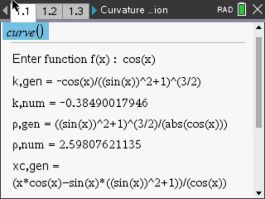
Works out how sharply a curve bends at a point: the curvature k, the radius of curvature, and the center that radius is measured from.
Plug in your TI-Nspire, turn it on, and click Send to calculator.
On Windows this works with the CX II. For an original CX, use TI's TI-Nspire software.
Sending straight to your calculator works in Chrome or Edge on a computer.
By Claus Martin Dachselt. Original release page
How to install it
- Download the program with the button above. You'll get a .tns file, the file type TI-Nspire calculators use.
- Open nspireconnect.ti.com in Chrome on a computer or Chromebook, and plug your calculator in with its charging cable.
- Choose File Transfer, then To Calculator, then From Computer, and pick the .tns file you just downloaded.
- When it lands, the calculator shows a prompt. Choose Open to jump straight into it.
It sits in My Documents afterwards, so you can reopen it any time.
TI's web app only supports the CX II and CX II CAS. If you have an original CX, or you already use the TI-Nspire Student Software, sending the file through that works the same.
Running it
Open the document, go to its calculator page, and enter curve() with nothing inside the brackets. It then asks for your function, and you type it at the prompt the way you would write it, cos(x) for instance.
You get the formula and the number
Every result comes back twice. The gen version is the general expression in terms of x, the num version is that expression evaluated at the point you asked about. The general form is what a "find an expression for the curvature" question wants; the numeric one checks your arithmetic at a specific point.
The radius and center together describe the circle that best matches your curve at that point, which is easier to picture than k on its own. For several function types it will plot that circle too.