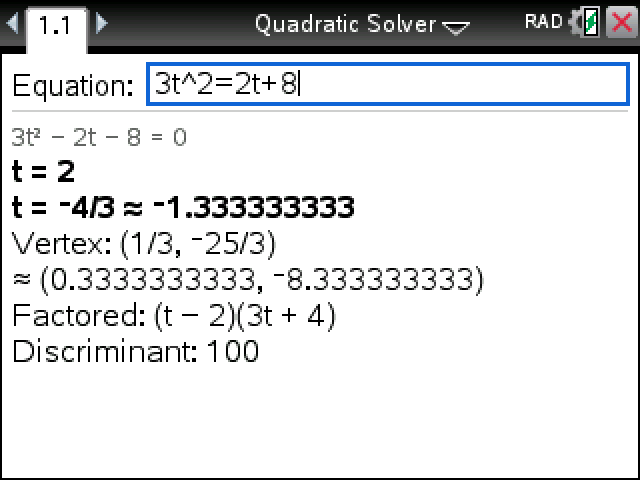
Type a quadratic the way the question prints it and press enter. The roots, the vertex, the factored form and the discriminant come up together on one screen.
Plug in your TI-Nspire, turn it on, and click Send to calculator.
On Windows this works with the CX II. For an original CX, use TI's TI-Nspire software.
Sending straight to your calculator works in Chrome or Edge on a computer.
By CalcPlex.
How to install it
- Download the program with the button above. You'll get a .tns file, the file type TI-Nspire calculators use.
- Open nspireconnect.ti.com in Chrome on a computer or Chromebook, and plug your calculator in with its charging cable.
- Choose File Transfer, then To Calculator, then From Computer, and pick the .tns file you just downloaded.
- When it lands, the calculator shows a prompt. Choose Open to jump straight into it.
It sits in My Documents afterwards, so you can reopen it any time.
TI's web app only supports the CX II and CX II CAS. If you have an original CX, or you already use the TI-Nspire Student Software, sending the file through that works the same.
Using it
Open Quadratic Solver from My Documents. The cursor is already in the Equation field.
- Type the equation as it stands, terms on both sides if that's how it came: 3t^2=2t+8. Leave off "=0" and it fills that in.
- For the square, use either the ^ key and 2 or the x² key.
- Press enter. To solve another one, press esc to clear the line.
Any letter works as the variable, so a height question like h=-16t^2+32t+6 goes in as written and gets solved for t. Function notation like f(x)=x^2-5x+6 works too.
What comes back
- Roots in exact form beside the decimal, like (3 + √17)/4 ≈ 1.780776406. A repeated root shows once, marked "(double root)".
- The vertex of the parabola.
- The factored form, whenever the roots are whole numbers or fractions.
- The discriminant, for the questions that ask what kind of roots there are.
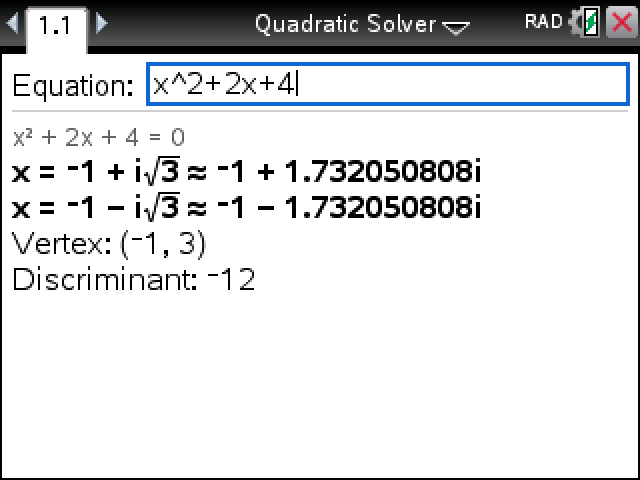
Complex roots come out with i, no mode change needed: x² + 2x + 4 gives −1 ± i√3. The exact forms show on non-CAS models too. On those, the built-in polyRoots only gives decimals like 2.41421356237.
If what you typed isn't a quadratic, say 2x+3=0, it tells you in one sentence and leaves the equation in place so you can fix it.