On the TI-84 Evo, invNorm is in the DISTR menu: press alpha, then stat, and pick it under Normal. It works backwards from normalcdf: you give it an area (a share of the scores), the mean and the standard deviation, and it gives you the score that cuts off that share.
The example here: test scores with a mean of 75 and a standard deviation of 10. What score sits at the 90th percentile?
Find the score at a percentile
- Press
alpha, thenstat. DISTR is the green label above the stat key, so this opens the distribution menu.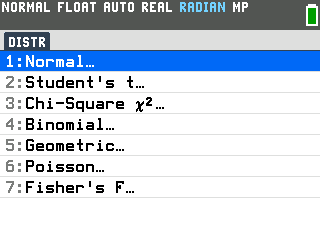
- Press
enterto open Normal. - Press the down arrow to invNorm(, then press
enter. That opens the InvNorm setup screen.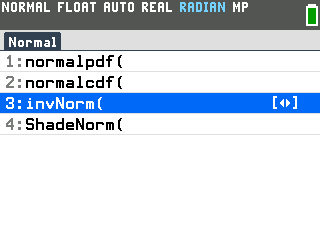
- Type the three numbers, pressing the down arrow after each one. Typing replaces
whatever is already in a box.
- area is the share of scores on one side of the score you want, as a decimal. The 90th percentile has 90% of scores below it: .9.
- μ is the mean: 75.
- σ is the standard deviation: 10.
- Press
enteron the tail row to select LEFT. The tail row says which side of the score the area is on, and LEFT means below it. The last down arrow already put the cursor on LEFT. The selected tail is the one filled in dark.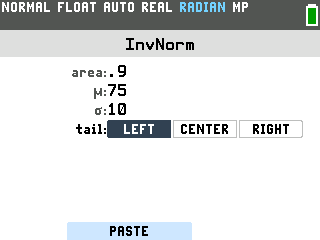
- Press
zoom. The zoom key works the PASTE button at the bottom of the screen, which puts the finished command on the home screen. - Press
enter. The answer is 87.81551567, so a score of about 87.8 is the 90th percentile.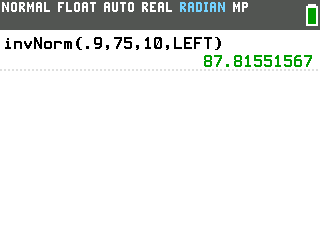
The top percent of scores: RIGHT
What score gets you into the top 5%? That 5% sits above the score, on the right side, so this one uses the RIGHT tail.
- Press
alpha,stat,enter, then the down arrow to invNorm( andenter. The setup screen still holds 75 and 10 from last time. - Type .05 in area.
- Press the down arrow to the tail row, then the right arrow to RIGHT. The cursor always starts the tail row on LEFT.
- Press
enterto select RIGHT. RIGHT is now selected. Moving the cursor onto a tail doesn't select it; onlyenterdoes.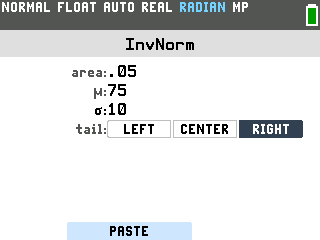
- Press
zoom, thenenter. The answer is 91.44853626, so it takes about 91.4 to land in the top 5%.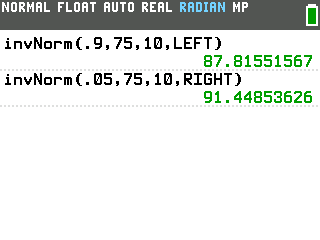
The middle percent of scores: CENTER
CENTER puts the area in the middle and gives both ends of that range at once. For the middle 95% of scores:
- Open invNorm again and type .95 in area.
- Press the down arrow to the tail row, the right arrow once to CENTER, then
enter. - Press
zoom, thenenter. The answer comes back in braces with two numbers, the low end first: the middle 95% of scores fall between about 55.4 and 94.6.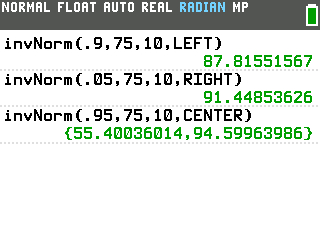
Good to know
- Getting ERROR: DOMAIN? The area has to be a decimal between 0 and 1. Typing 90 for 90% gives this error. Choose Quit, reopen invNorm and type .9.
- The setup screen remembers your last numbers and tail. Check all four boxes before you paste.
- Prefer to stick with LEFT? For the top 5%, type the area below the score instead: invNorm(.95, 75, 10, LEFT) gives the same 91.44853626.
- For z-scores, set μ to 0 and σ to 1. The z-score at the 95th percentile is invNorm(.95, 0, 1, LEFT) = 1.644853626.
- Following a video made on another TI-84? Those open the distribution menu with
2nd,vars. On the Evo that opens the MATRIX menu, and DISTR isalpha,stat. - Have a score and need the probability? That's normalcdf, right above invNorm in the Normal menu.