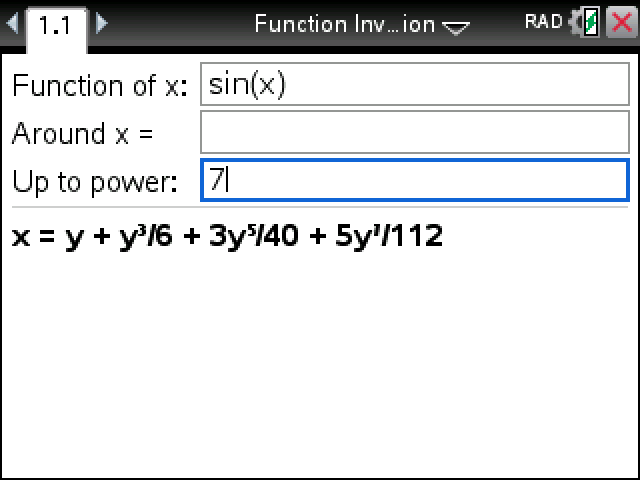
Writes the inverse of a function as a power series. Give it sin(x) and you get the arcsin series back: x = y + y³/6 + 3y⁵/40 + 5y⁷/112.
Plug in your TI-Nspire, turn it on, and click Send to calculator.
On Windows this works with the CX II. For an original CX, use TI's TI-Nspire software.
Sending straight to your calculator works in Chrome or Edge on a computer.
By CalcPlex.
How to install it
- Download the program with the button above. You'll get a .tns file, the file type TI-Nspire calculators use.
- Open nspireconnect.ti.com in Chrome on a computer or Chromebook, and plug your calculator in with its charging cable.
- Choose File Transfer, then To Calculator, then From Computer, and pick the .tns file you just downloaded.
- When it lands, the calculator shows a prompt. Choose Open to jump straight into it.
It sits in My Documents afterwards, so you can reopen it any time.
TI's web app only supports the CX II and CX II CAS. If you have an original CX, or you already use the TI-Nspire Student Software, sending the file through that works the same.
The three fields
Open Function Inversion from My Documents.
- Function of x: the function to invert. sin, cos, tan and their inverses are on the trig key; ln, eˣ, √ and π work too.
- Around x =: the point the series is built around. Leave it blank for 0, or type something like 1, 1/2 or π/6.
- Up to power: how far the series goes, from 1 to 10. Blank means 5.
Press enter. The answer is x written in terms of y, since you're asking what x went in to give that y.
Around a point other than 0
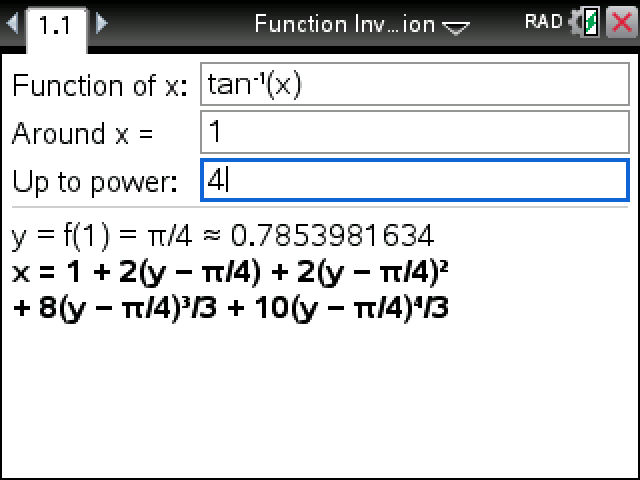
Pick another point and the first line gives the value there, then the series is in powers of (y − that value). tan⁻¹(x) around 1 starts with y = f(1) = π/4 and goes on 1 + 2(y − π/4) + 2(y − π/4)² and so on. Coefficients stay exact when they can, as fractions, π and square roots, and turn into decimals when they can't (sin(x) around 1, for example).
Kepler's equation works with a number for the eccentricity: x-0.2sin(x) gives x = 5y/4 − 125y³/1536 + 4375y⁵/196608.
When there's no series
If the slope at your point is 0, the inverse has no power series there. Try x² around 0 and it says exactly that and asks for another point. A function that isn't defined at the point gets its own sentence too.
All of this runs on non-CAS models as well as the CAS ones.