On the TI-84 Evo, normalcdf is in the DISTR menu: press alpha, then stat, and pick it under Normal. Give it the two ends of a range, the mean and the standard deviation, and it returns the probability that a value falls in that range.
The example here: test scores with a mean of 75 and a standard deviation of 10. What's the probability that a score falls between 85 and 100?
Find the probability between two values
- Press
alpha, thenstat. DISTR is the green label above the stat key, so this opens the distribution menu.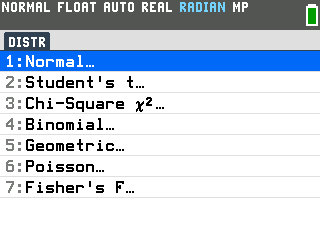
- Press
enterto open Normal. - Press the down arrow to normalcdf(, then press
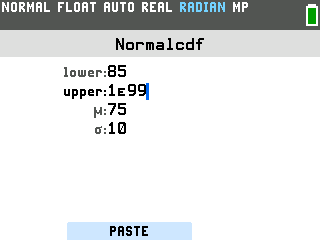
enter. That opens the Normalcdf setup screen, with a box for each number.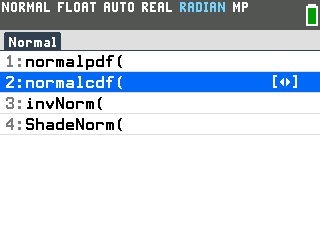
- Type the four numbers, pressing the down arrow after each one. Typing replaces
whatever is already in a box.
- lower is the low end of the range: 85.
- upper is the high end: 100.
- μ is the mean: 75.
- σ is the standard deviation: 10.
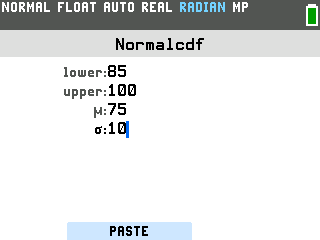
- Press
zoom. The zoom key works the PASTE button at the bottom of the screen, which puts the finished command on the home screen. Pressingenterhere only moves between the boxes. - Press
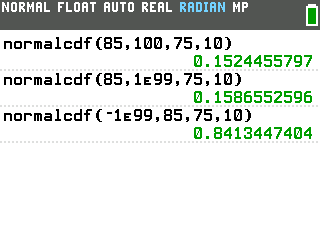
enter. The answer is 0.1524455797, so about 15% of scores fall between 85 and 100.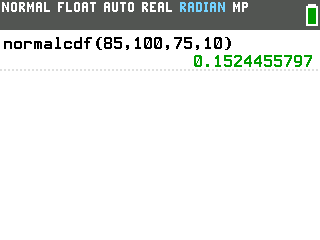
Greater than or less than one value
The normalcdf command always needs both ends of the range. A "greater than" or "less than" question has no end on one side, so use 1E99 there. That's a 1 followed by 99 zeros, far past any test score.
To type the E, press 2nd, then the comma key (EE is the blue label above it). For
−1E99, start with the (−) key.
| Probability | lower | upper | Answer |
|---|---|---|---|
| Score above 85 | 85 | 1E99 | 0.1586552596 |
| Score below 85 | −1E99 | 85 | 0.8413447404 |
Open normalcdf the same way, type over lower and upper, leave μ at 75 and σ at 10, then press
zoom and enter.
Good to know
- The boxes remember your last numbers. Reopen normalcdf and every box still holds what you typed last time, so check all four before you paste.
- Getting ERROR: SYNTAX? Check for an empty box. A blank upper bound pastes as two commas in a row, and enter gives ERROR: SYNTAX.
- For z-scores, set μ to 0 and σ to 1. The probability of a z-score between −1 and 1 is normalcdf(−1, 1, 0, 1) = 0.6826894809.
- Following a video made on another TI-84? Those open the distribution menu with
2nd,vars. On the Evo that opens the MATRIX menu, and DISTR isalpha,stat. - Have the probability and need the score? That's invNorm, right below normalcdf in the Normal menu.