On the TI-84 Evo, binompdf and binomcdf are in the DISTR menu: press alpha, then stat, and open Binomial. binompdf gives the probability of exactly one number of successes. binomcdf adds up a range of them, which is what "at most" and "at least" questions need.
The example here: a basketball player makes 70% of their free throws and takes 10 shots. What's the probability they make exactly 7? At most 7? At least 7?
Exactly 7: binompdf
- Press
alpha, thenstat. DISTR is the green label above the stat key, so this opens the distribution menu.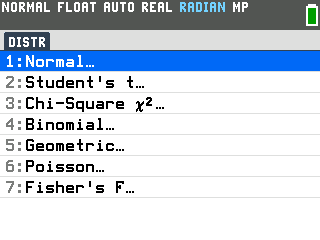
- Press the down arrow to Binomial, then press
enter.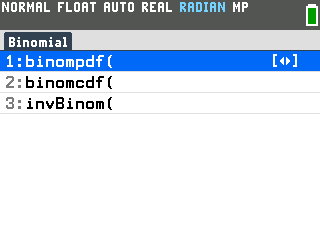
- Press
enterto select binompdf(. That opens the Binompdf setup screen. - Type 10 for trials, then press the down arrow. trials is the number of shots. Typing replaces whatever is already in a box.
- Type .7 for p, then press the down arrow. p is the chance of success on each shot.
- Type 7 for x value. That's the number of successes you're asking about.
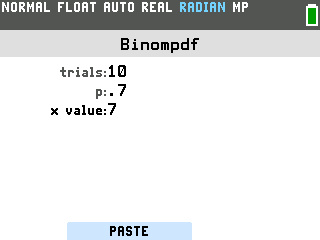
- Press
zoom. The zoom key works the PASTE button at the bottom of the screen, which puts the finished command on the home screen. Pressingenterhere only moves between the boxes. - Press
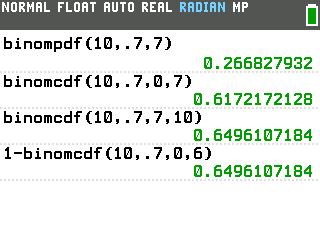
enter. The answer is 0.266827932, so the player makes exactly 7 of 10 about 27% of the time.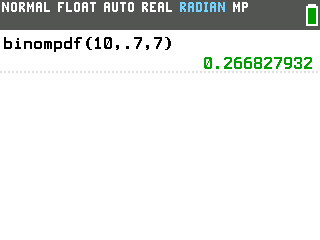
At most 7: binomcdf from 0 to 7
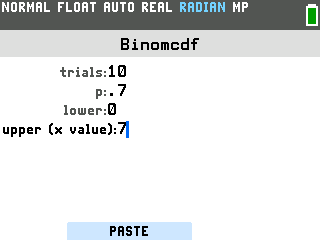
"At most 7" means anywhere from 0 to 7 made shots. binomcdf has a box for each end of that range.
- Press
alpha, thenstat, and open Binomial again. - Press the down arrow to binomcdf(, then press
enter. trials and p still hold 10 and .7 from binompdf. - Check that lower is 0, then press the down arrow until the cursor reaches upper, and type
7.
- Press
zoom, thenenter. The answer is 0.6172172128, about 62%.
At least 7: binomcdf from 7 to 10
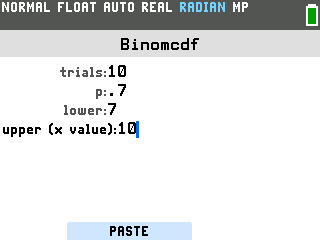
"At least 7" means 7, 8, 9 or 10 made shots, so the range runs from 7 up to the number of trials.
- Press
alpha, thenstat, and open Binomial again. - Press the down arrow to binomcdf(, then press
enter. - Press the down arrow until the cursor reaches lower, and type 7.
- Press the down arrow and type 10 for upper.
- Press
zoom, thenenter. The answer is 0.6496107184, about 65%.
You'll often see "at least 7" written as 1 − binomcdf(10, .7, 6): everything, minus the chance of 6 or fewer. That works on the Evo too:
- On the home screen, type 1 and press the minus key.
- Press
alpha, thenstat, and pick binomcdf( under Binomial. Set lower to 0 and upper to 6. - Press
zoom, thenenter. The command pastes right after the 1−, and the answer is the same 0.6496107184.
Fewer than, more than: which numbers go in the boxes
"Fewer than 7" leaves 7 out, so its range stops at 6. "More than 7" starts at 8.
| Question | Setup screen | Answer |
|---|---|---|
| Exactly 7 | binompdf, x value 7 | 0.266827932 |
| At most 7 | binomcdf, lower 0, upper 7 | 0.6172172128 |
| Fewer than 7 | binomcdf, lower 0, upper 6 | 0.3503892816 |
| At least 7 | binomcdf, lower 7, upper 10 | 0.6496107184 |
| More than 7 | binomcdf, lower 8, upper 10 | 0.3827827872 |
Good to know
- The boxes remember your last numbers. binompdf and binomcdf share trials and p, and each keeps the rest of its boxes too, so check every box before you paste.
- Getting ERROR: BOUNDS? lower is bigger than upper. Swap them.
- Getting ERROR: SYNTAX? Check for an empty box. A blank lower box pastes as two commas in a row.
- Leave x value empty in binompdf and you get a list instead: the probability of every count from 0 to 10.
- Following a video made on another TI-84? Those open the distribution menu with
2nd,vars. On the Evo that opens the MATRIX menu, and DISTR isalpha,stat. Their binomcdf(10, .7, 7) with three numbers also works on the Evo and gives the same answer as lower 0, upper 7. - Working with a bell curve instead? That's normalcdf, under Normal in the same menu.