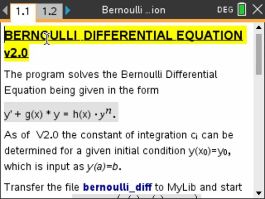
Solves the Bernoulli differential equation, the family that looks like y' + g(x)·y = h(x)·yn. Solving one by hand means a substitution that turns it linear first, and that substitution is where the sign errors live.
Plug in your TI-Nspire, turn it on, and click Send to calculator.
On Windows this works with the CX II. For an original CX, use TI's TI-Nspire software.
Sending straight to your calculator works in Chrome or Edge on a computer.
By Claus Martin Dachselt. Original release page
How to install it
- Download the program with the button above. You'll get a .tns file, the file type TI-Nspire calculators use.
- Open nspireconnect.ti.com in Chrome on a computer or Chromebook, and plug your calculator in with its charging cable.
- Choose File Transfer, then To Calculator, then From Computer, and pick the .tns file you just downloaded.
- When it lands, the calculator shows a prompt. Choose Open to jump straight into it.
Bernoulli Differential Equation's own documentation asks you to put it in the MyLib folder rather than My Documents, then choose Refresh Libraries from the Documents menu. That is what makes its commands available from any document you open afterwards.
TI's web app only supports the CX II and CX II CAS. If you have an original CX, or you already use the TI-Nspire Student Software, sending the file through that works the same.
With or without an initial condition
Left alone it returns the general solution, constant of integration and all. Version 2.0 added the other half: give it a starting point and it pins that constant down for you, so you get the one particular solution instead of a family of them.
The initial condition goes in the short way. A condition of y(0) = 1 is typed as y(0)=1, matching the y(a)=b shape the author's notes use.