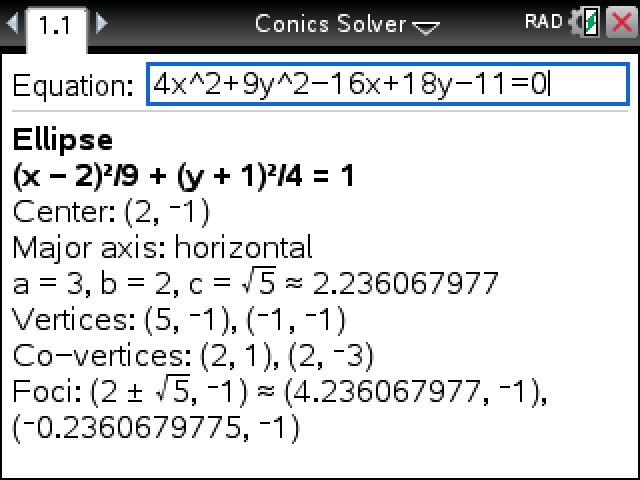
Type the equation of a circle, ellipse, parabola or hyperbola in x and y. It tells you which one it is, rewrites it in standard form and lists the features the question is likely to ask for.
Plug in your TI-Nspire, turn it on, and click Send to calculator.
On Windows this works with the CX II. For an original CX, use TI's TI-Nspire software.
Sending straight to your calculator works in Chrome or Edge on a computer.
By CalcPlex.
How to install it
- Download the program with the button above. You'll get a .tns file, the file type TI-Nspire calculators use.
- Open nspireconnect.ti.com in Chrome on a computer or Chromebook, and plug your calculator in with its charging cable.
- Choose File Transfer, then To Calculator, then From Computer, and pick the .tns file you just downloaded.
- When it lands, the calculator shows a prompt. Choose Open to jump straight into it.
It sits in My Documents afterwards, so you can reopen it any time.
TI's web app only supports the CX II and CX II CAS. If you have an original CX, or you already use the TI-Nspire Student Software, sending the file through that works the same.
Running it
Open Conics Solver from My Documents. Type the equation the way it's printed, like 4x^2+9y^2-16x+18y-11=0, and press enter. Terms can sit on either side of the equals sign.
What you get for each conic
The type and the standard form come first, in bold. The rest depends on the shape:
- Circle: center and radius.
- Ellipse: center, which axis is the major one, a, b and c, the vertices, co-vertices and foci.
- Hyperbola: center, which way it opens, a, b and c, the vertices, foci and asymptotes.
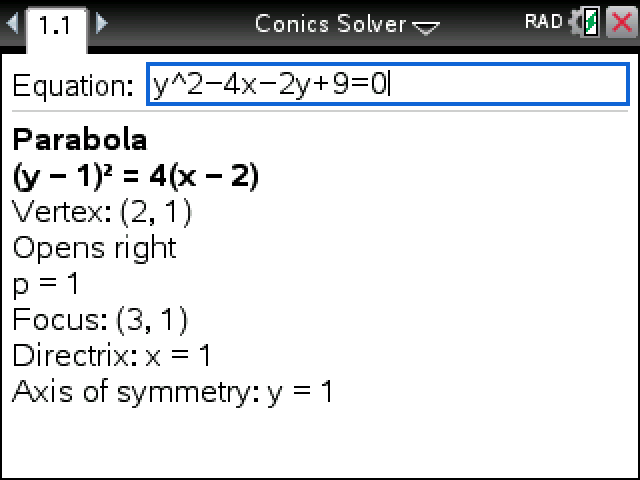
- Parabola: vertex, which way it opens, p, the focus, the directrix and the axis of symmetry.
Values stay exact, with the decimal alongside when there's a root in them: a focus at (2 + √5, −1) also shows as (4.236067977, −1).
When it isn't a regular conic
Some equations look like a circle and aren't. For x² + y² − 2x + 1 = 0 it says only the point (1, 0) fits, and for x² + y² + 2x + 2y + 5 = 0 that no points do. An equation with an xy term is a rotated conic, which it says it doesn't cover.
Non-CAS models don't have the completeSquare command. This runs on them the same as on the CAS.