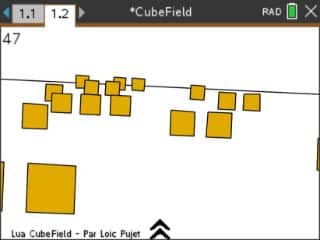
An endless field of cubes is coming at you, and your only job is to not hit any of them. If you ever played CubeRunner on a phone, this is that rush on your calculator.
By Chockosta. Original release page
How to install it
- Download the game with the button above. You'll get a .tns file, the file type TI-Nspire calculators use.
- Open nspireconnect.ti.com in Chrome on a computer or Chromebook, and plug your calculator in with its charging cable.
- Choose File Transfer, then To Calculator, then From Computer, and pick the .tns file you just downloaded.
- When it lands, the calculator shows a prompt. Choose Open and you're playing.
TI's web app only supports the CX II and CX II CAS. If you have an original CX, or you already use the TI-Nspire Student Software, sending the file through that works the same. The game lives in My Documents afterwards, so you can reopen it any time.
How it plays
You fly forward automatically and weave with the left and right arrows (or 4 and 6). Points build the longer you survive.
Every 1000 points the cubes part into a corridor. That's your breather, and your warning: it means the next level is starting and the speed is going up. By the third or fourth corridor you're steering on pure instinct.
One key each way, no pause for negotiation. Runs end fast and restart faster.