The TI-84 Evo has a Lines and Conics app that graphs a circle straight from its center and radius.
Open the Lines and Conics app
- Press
onfor the app grid, and arrow onto the circle-and-line icon (a circle crossed by a line, labelled x+y=1). The bar along the top reads LINES AND CONICS when you have the right one. If the icon is missing, restoring your missing apps brings it back.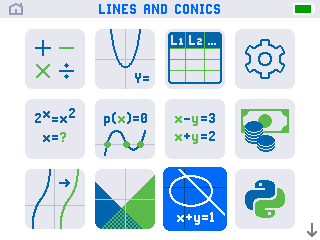
- Press
enterto open it. You land on a list of equation rows, E1 through E6, with the first row, Add Equation, highlighted.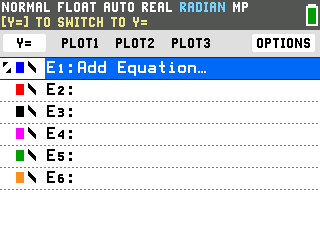
Pick the circle equation
- Press
enteron Add Equation, then arrow right to the circle form. A picker opens on a line equation; each press of the right arrow steps to the next form. Stop when it reads CIRCLE, with (X−H)²+(Y−K)²=R² below it (three presses).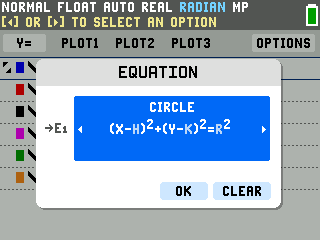
- Press the down arrow to
OK, thenenter. The row fills with an empty template, (X−□)²+(Y−□)²=□², and the cursor sits in the first box.
Fill in the center and radius
This graphs (x − 2)² + (y + 3)² = 16, a circle centered at (2, −3) with a radius of 4.
- Enter the center's x. The first box is H, the x of the center. Press 2, then the right arrow to move to the next box.
- Enter the center's y. The next box is K, the y of the center. It is negative here, so
press the
(-)negative key, not the minus key, then 3. The box shows Y − (−3). Press the right arrow to the last box. - Enter the radius. The last box is already squared on screen, so type the radius itself,
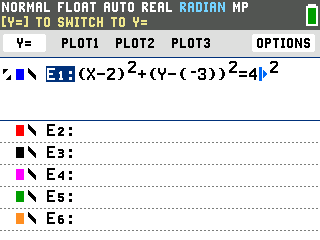
not its square: press 4. The row now reads (X−2)²+(Y−(−3))²=4².
Graph it
- Press
graph. The circle draws, centered at (2, −3) with radius 4.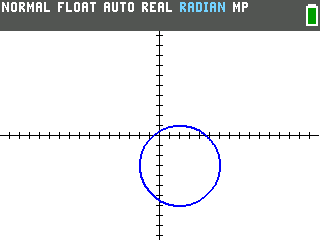
- Press
traceto read points off it. The left and right arrows walk the cursor around the circle, and its coordinates show at the bottom of the screen. It starts at the left edge, (−2, −3).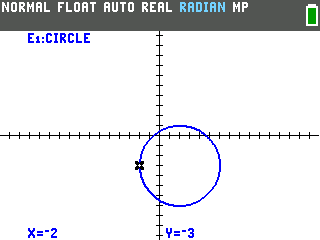
Good to know
- Reading the center from your equation. The form subtracts H and K, so a plus sign in the equation means a negative center value: (y + 3)² is K = −3. The center always sits at (H, K).
- An equation that's already multiplied out. The picker's other circle option is the general form, A·X²+A·Y²+B·X+C·Y+D=0. Pick that one when your equation isn't written as a center and radius.
- More than one at a time. Rows E2 through E6 hold more equations, so you can graph several circles, or mix in lines and parabolas, on the same axes. Each one draws in its own color.
- Leaving the app. QUIT (
2ndthenmode) drops you back on the home screen, andonflips between the home screen and the app grid.