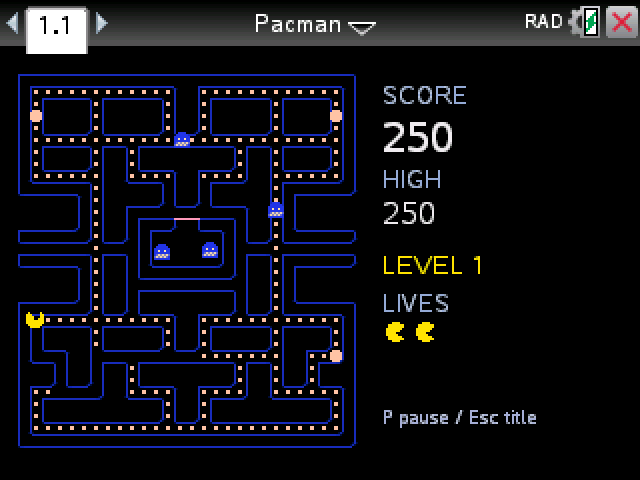
Pac-Man on the full arcade maze: 240 dots, four power pellets, the side tunnel and all four ghosts. Clear the board to move up a level.
By CalcPlex.
How to install it
- Download the game with the button above. You'll get a .tns file, the file type TI-Nspire calculators use.
- Open nspireconnect.ti.com in Chrome on a computer or Chromebook, and plug your calculator in with its charging cable.
- Choose File Transfer, then To Calculator, then From Computer, and pick the .tns file you just downloaded.
- When it lands, the calculator shows a prompt. Choose Open and you're playing.
TI's web app only supports the CX II and CX II CAS. If you have an original CX, or you already use the TI-Nspire Student Software, sending the file through that works the same. The game lives in My Documents afterwards, so you can reopen it any time.
Controls
- enter starts a game from the title screen.
- The arrows on the touchpad steer. Pac-Man keeps moving on his own, so press the next direction a little before the corner and he takes the first opening.
- P pauses. esc goes back to the title and ends the game you're in.
The ghosts
Each ghost hunts you its own way, like in the arcade:
- Blinky, the red one, comes straight for you, and gets faster once the maze is nearly empty.
- Pinky aims a few tiles in front of you, so she tends to cut you off.
- Inky, the cyan one, works off where Blinky is. He's the hardest to read.
- Clyde, the orange one, chases you until he gets close, then wanders back to his corner.
Every so often all four break off and head for their own corners for a few seconds. That's your chance to clear a crowded part of the maze.
Power pellets and points
- Dots are 10 points. The four big blinking pellets are 50.
- A pellet turns the ghosts blue for a few seconds. Eat them one after another for 200, 400, 800 and 1,600.
- Blue ghosts flash white just before they turn back. An eaten ghost floats home as a pair of eyes and comes back out.
- Fruit shows up under the ghost house twice a level for about ten seconds. It starts as a 100-point cherry and works up to a 5,000-point key on level 13.
- You get three lives, plus one more at 10,000 points.
Later levels
Everyone gets faster over the first five levels, and the blue time keeps shrinking. Past level 16 a pellet mostly doesn't turn the ghosts blue at all, so it's pure dodging.
The side tunnel slows the ghosts down but not you, which helps when one is right on your tail.
The maze is drawn a bit smaller than the arcade's so the score fits beside it, and the level number takes the place of the fruit row. Your high score stays until you close the document.