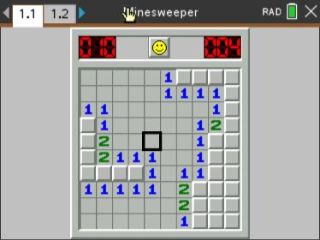
The classic desktop time-killer, on your calculator. Open every safe cell without clicking a mine, using the numbers as your only clues.
By Jonas Geiler. MIT license. Original release page
How to install it
- Download the game with the button above and unzip it, then send Minesweeper.tns to your calculator. That's the game. The other files are the author's readme and licence, which their terms require us to keep with it.
- Open nspireconnect.ti.com in Chrome on a computer or Chromebook, and plug your calculator in with its charging cable.
- Choose File Transfer, then To Calculator, then From Computer, and pick the .tns file you just downloaded.
- When it lands, the calculator shows a prompt. Choose Open and you're playing.
TI's web app only supports the CX II and CX II CAS. If you have an original CX, or you already use the TI-Nspire Student Software, sending the file through that works the same. The game lives in My Documents afterwards, so you can reopen it any time.
How to play
Each number tells you how many mines sit in the eight cells around it. Cross-reference a few numbers and you can prove where the mines are, no guessing needed. Usually.
- Arrow keys move the cursor.
- enter opens the cell.
- (-) or F plants a flag where you know a mine is.
- menu lets you change the difficulty or turn question marks on and off.
Open a mine and the round is over, so flag first and open second whenever you're not sure.