The TI-84 Evo has a built-in tool that gives you the mean and median at once, and the mode takes one extra step.
Enter your data into a list
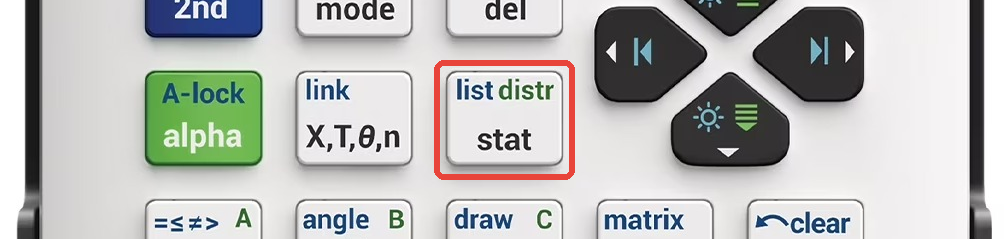
- Press the STAT key and choose 1: Edit. This opens the list
editor, a grid of columns named L1 through L6.
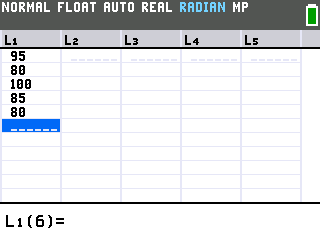
- Type your numbers into column L1, pressing ENTER after each.
Here we'll use five test scores: 95, 80, 100, 85, 80.
If L1 already has numbers in it, move the cursor up onto the L1
label at the top of the column, press clear, then press the down
arrow. That empties the column so you can start fresh.
Calculate the mean and median
- Press the STAT key again. Arrow right to the CALC tab and
press
enterto choose 1-Var Stats, the one-variable statistics tool.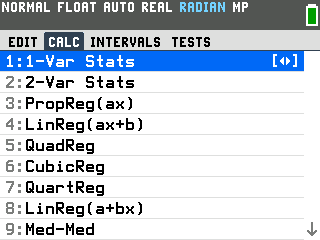
- Make sure LIST reads L1, then press ZOOM to run CALCULATE.
If LIST shows a different list, press
clear, then2ndand1to set it to L1.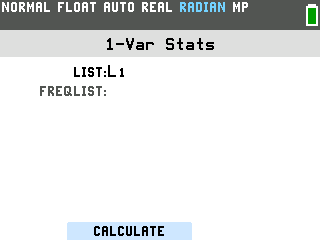
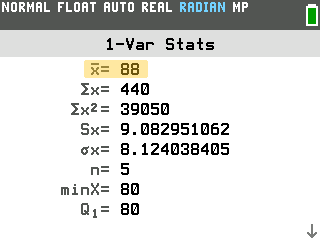
- Read the mean off the top line. x̄ is the mean; for
these scores it's 88.
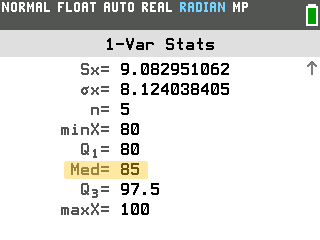
- Press the down arrow to scroll down. Med is the median; for
these scores it's 85.
Find the mode
The calculator doesn't find the mode for you, but a quick sort of the list makes it easy to spot.
- Press the STAT key and choose 2: SortA(. Enter L1 by pressing
2ndthen1, then pressenter. The calculator sorts L1 into ascending order and reports Done.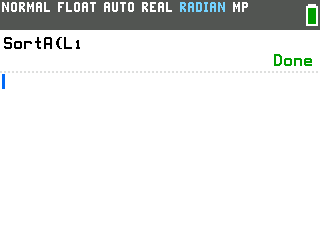
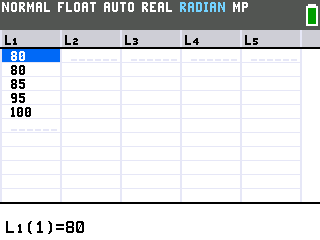
- Open the list editor again with STAT, then 1: Edit. Now that
the list is sorted, the same numbers sit next to each other, so scroll through
and find which number repeats the most times in a row. Here, 80 shows up twice,
so 80 is the mode.
Good to know
- Each measure has its own command. On the home screen, press
2ndthenstatto open the LIST menu and arrow to MATH.mean(L1)returns the mean on its own,median(L1)the median, andmax(L1)−min(L1)gives the range directly, useful when you only need one number. - Working from a frequency table? When your data comes as
values with how often each one occurs, type the values in L1 and the counts in
L2, then on the 1-Var Stats screen arrow down to FREQLIST and press
2ndthen2for L2 before you press zoom.