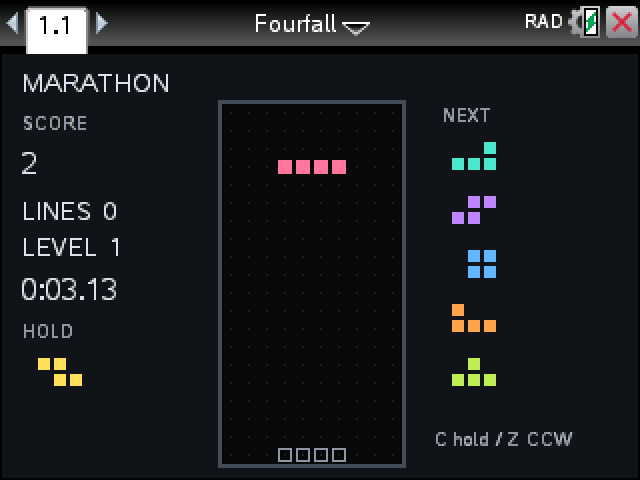
Our Tetris-style game is called Fourfall. Pieces drop into a well ten squares wide, full rows clear, and you lose when the stack reaches the top.
By CalcPlex.
How to install it
- Download the game with the button above. You'll get a .tns file, the file type TI-Nspire calculators use.
- Open nspireconnect.ti.com in Chrome on a computer or Chromebook, and plug your calculator in with its charging cable.
- Choose File Transfer, then To Calculator, then From Computer, and pick the .tns file you just downloaded.
- When it lands, the calculator shows a prompt. Choose Open and you're playing.
TI's web app only supports the CX II and CX II CAS. If you have an original CX, or you already use the TI-Nspire Student Software, sending the file through that works the same. The game lives in My Documents afterwards, so you can reopen it any time.
Three modes
On the title screen, up and down pick the mode and left and right set the starting level, 1 to 15.
- Marathon: the level goes up every 10 lines and the pieces fall faster. It ends at 150 lines.
- 40 Lines: clear 40 lines against the clock.
- Time Trial: two minutes to score as much as you can.
Controls
- left and right move the piece one column per press. Hold the key to keep sliding.
- up rotates and Z rotates the other way.
- down drops it one row, enter drops it all the way.
- C puts the piece in hold, or swaps it back out. Once per piece.
- S switches fast drop on and off.
- P pauses and hides the board, esc goes back to the title.
The outline at the bottom shows where the piece will land, and the next five are lined up on the right. Four rows at once pays the most, T-spins score extra, and clearing rows with piece after piece adds a combo bonus.