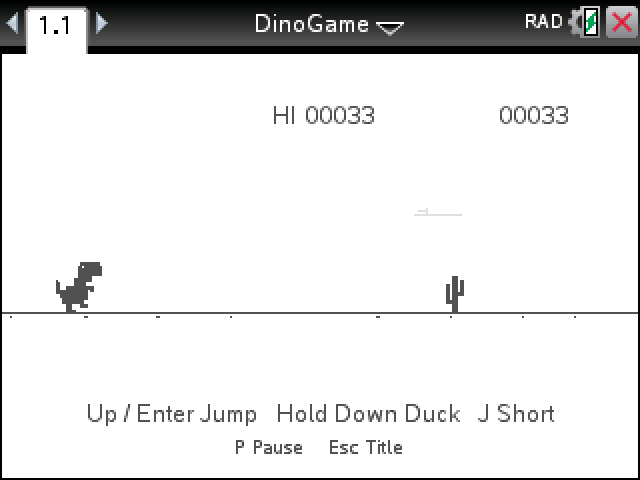
Our take on the little dinosaur from Chrome's offline page, on your calculator. Run, jump the cacti, duck the birds, and see how far you get.
By CalcPlex. Speeds, jumps and obstacles adapted from Chromium's dino game, BSD license.
How to install it
- Download the game with the button above and unzip it, then send DinoGame.tns to your calculator. That's the game. The text file beside it is the license notice for Chromium's dino game.
- Open nspireconnect.ti.com in Chrome on a computer or Chromebook, and plug your calculator in with its charging cable.
- Choose File Transfer, then To Calculator, then From Computer, and pick the .tns file you just downloaded.
- When it lands, the calculator shows a prompt. Choose Open and you're playing.
TI's web app only supports the CX II and CX II CAS. If you have an original CX, or you already use the TI-Nspire Student Software, sending the file through that works the same. The game lives in My Documents afterwards, so you can reopen it any time.
Keys
- enter starts a run.
- up or enter jumps. J does a short hop for when a full jump would land you on the next cactus.
- Hold down to duck. Press it in mid-air and the dino drops straight back down.
- P pauses and esc goes back to the title.
How a run goes
The first few seconds are empty ground. Then the cacti start, in clusters once you're moving fast enough, and later the birds: jump the low ones, duck the middle ones, and keep running under the high ones.
The speed keeps climbing, the score flashes at every 100, and every 700 points the screen turns to night for a few seconds. The jump arc, the speeds and the gaps between obstacles come from Chrome's own game, so a good run here feels like a good run in the browser.
Your high score stays at the top until you close the document.