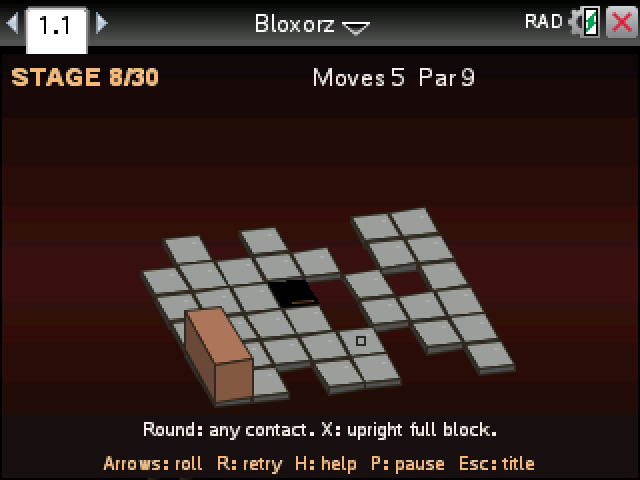
Roll a tall block across a floating course and drop it into the hole standing upright. Our version has 30 stages, each with a par for the fewest rolls that solve it.
By CalcPlex.
How to install it
- Download the game with the button above. You'll get a .tns file, the file type TI-Nspire calculators use.
- Open nspireconnect.ti.com in Chrome on a computer or Chromebook, and plug your calculator in with its charging cable.
- Choose File Transfer, then To Calculator, then From Computer, and pick the .tns file you just downloaded.
- When it lands, the calculator shows a prompt. Choose Open and you're playing.
TI's web app only supports the CX II and CX II CAS. If you have an original CX, or you already use the TI-Nspire Student Software, sending the file through that works the same. The game lives in My Documents afterwards, so you can reopen it any time.
Keys
- The arrow keys tip the block over in that direction.
- On the title screen, left and right pick a stage. All 30 are open from the start. H shows the rules and enter starts.
- R restarts the stage, P pauses, and esc goes back to the title. After a clear, enter moves on to the next stage.
Reading the board
- Gray tiles are solid floor. Tip over an edge and the stage starts again.
- Orange tiles hold the block lying down, but stand on one and it gives way.
- Round switches work with any part of the block on them. X switches only work when the block stands on them upright.
- Switches open green bridges. A red mark is a gap that's still closed, and some switches close it again the next time you hit them.
- A split pad breaks the block into two small cubes. space or S swaps which one you're moving, and they snap back together when they end up side by side.
Only the whole block can finish, so a stage with a split pad is never done until the cubes are joined again. Swapping cubes doesn't count as a move. Every roll does, and your best for each stage stays until you close the document.