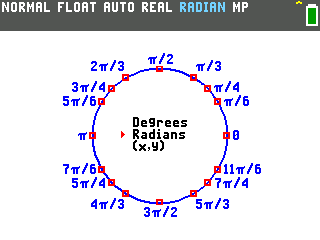
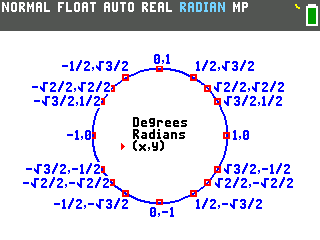
This program draws the whole unit circle on the calculator screen: every standard angle, labeled in degrees, radians, or exact (x,y) coordinates like √3/2, switchable with the arrow keys.
By CalcPlex.
Send it to your calculator
Nothing listed in the connect popup: the calculator has to be plugged in and switched on to appear. Wake it up, check the USB cable (charge-only cables won't work), or move to a different port. Close any other tab that's using the calculator.
Have a TI-84 Plus CE? Get Unit Circle for the CE.
Open it on the calculator
- Press the
prgmkey. The PROGRAMMING menu opens.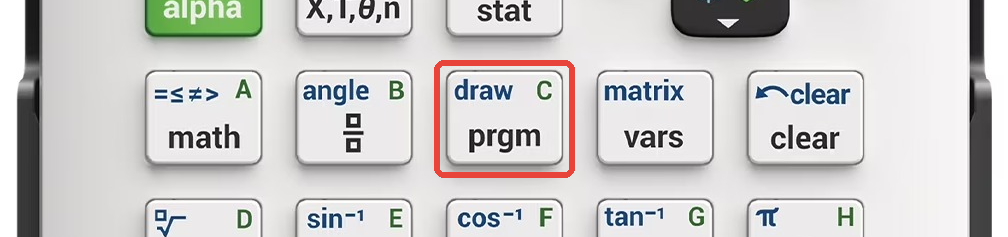
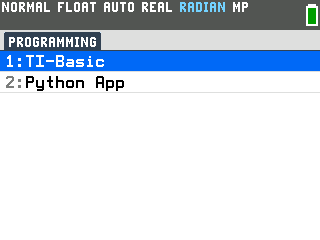
- Press
enterto select TI-Basic. The list of TI-Basic programs opens.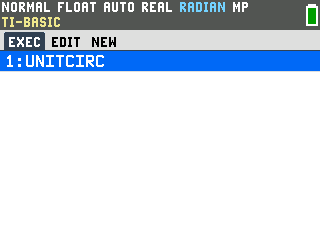
- Press
enteron UNITCIRC in the program list, which puts prgmUNITCIRC on the home screen. - Press
enterto run it. The circle draws with every standard angle labeled in radians, and a small menu sits in the middle with a pointer on Radians.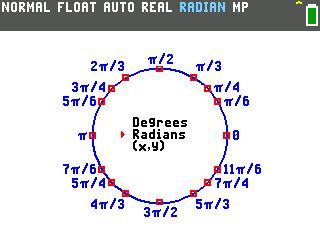
Switch between degrees, radians, and (x,y)
- Arrow up to Degrees and press
enter. The circle relabels in whichever view the pointer is on: Degrees marks every angle from 0° to 330°.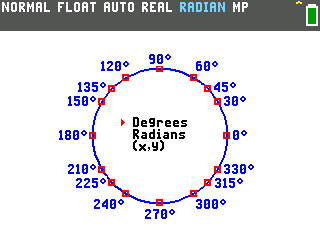
- Select (x,y) for the coordinates. Every point shows
its pair as exact values: the first number is the cosine of that angle, the second is
the sine, so cos 150° reads straight off the circle as −√3/2.
- Press
clearwhen you're done. The circle closes and you're back on the home screen.