Type the two sides of a right triangle you know and this program gives you the third, whether that's the hypotenuse or a missing leg.
By CalcPlex.
Send it to your calculator
Nothing listed in the connect popup: the calculator has to be plugged in and switched on to appear. Wake it up, check the USB cable (charge-only cables won't work), or move to a different port. Close any other tab that's using the calculator.
Have a TI-84 Plus CE? Get Pythagorean Theorem for the CE.
Open it on the calculator
- Press the
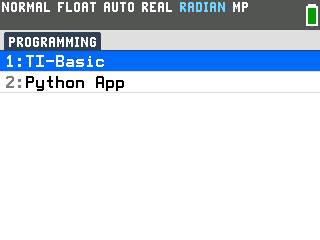
prgmkey. The PROGRAMMING menu opens.
- Press
enterto select TI-Basic. The list of TI-Basic programs opens.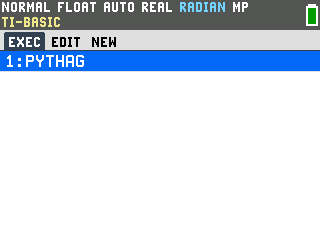
- Press
enteron PYTHAG in the program list, which puts prgmPYTHAG on the home screen. - Press
enterto run it. The program opens with a menu asking which side of the triangle you're missing.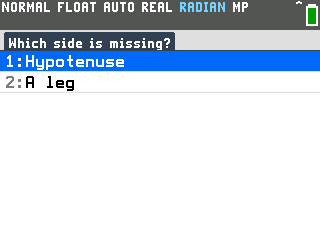
Find the hypotenuse
- Press
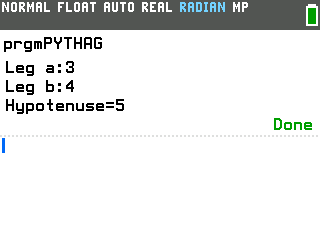
enterto choose Hypotenuse. The program asks for the two legs, one at a time. Type each leg and press enter after it. For legs of 3 and 4, the moment you enter the second one it answers Hypotenuse=5.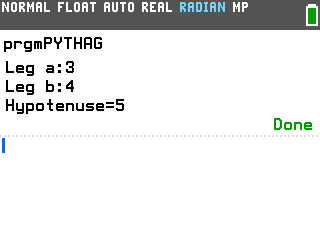
Find a missing leg
- Run the program again. A single enter on the home screen reruns it, and the menu comes back.
- Scroll down to
A legand pressenter. Now it asks for the leg you know, then the hypotenuse. With a leg of 5 and a hypotenuse of 13, it fills in Other leg=12.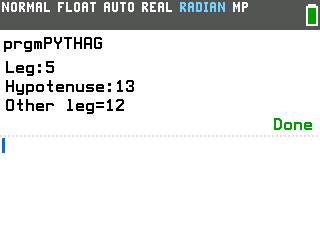
Good to know
- It's the Pythagorean theorem, worked out for you. The program solves a² + b² = c² for whichever side you asked about: √(a² + b²) for the hypotenuse, √(c² − a²) for a leg.
- Sides don't have to be whole numbers. Decimals work at every prompt: legs of 1.5 and 2 give Hypotenuse=2.5.
- Answers that aren't whole come out as decimals. Legs of 2 and 4 give 4.472135955 rather than the exact √20. If you want the tidy radical form, the Radical Simplifier program turns 20 into 2√5.
- Rerun it with one keypress. Pressing enter on the home screen repeats whatever you ran last, so right after a run, a single enter brings the menu straight back.
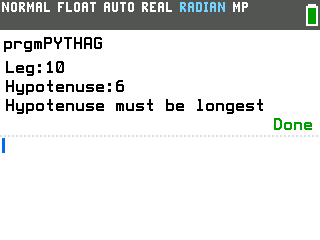
- The hypotenuse is always the longest side. In the A leg option, if the
leg you type is as long as the hypotenuse or longer, the program answers "Hypotenuse must be
longest" instead of dropping you on an error screen.