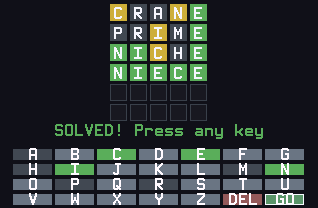
Six guesses to find the five-letter word, right on your calculator. Green means right letter in the right spot, yellow means right letter in the wrong spot, and gray means the letter isn't in the word.
Nothing listed in the connect popup: the calculator has to be plugged in and switched on to appear. Wake it up, check the USB cable (charge-only cables won't work), or move to a different port. Close any other tab that's using the calculator.
By CalcPlex.
Controls
- Letter keys: type each letter with the key that has it printed in green above it. You don't press alpha. For example, A is on the math key.
- DEL erases the last letter.
- ENTER submits the guess. It needs five letters that make a word on the list.
- The arrows, 2nd and alpha do nothing during a round.
- CLEAR goes back to the title screen. If you had already made a guess, this ends your win streak. Press it again on the title screen to quit.
- On the title screen, left / right arrows switch between NORMAL and HARD and ENTER starts.
- After a round, ENTER plays the next word and left / right arrows or CLEAR go back to the title screen.
Hard mode and stats
Hard mode makes you reuse every green and yellow letter you've revealed, and it tells you exactly which rule a rejected guess broke.
Your streak and win stats are saved, with a guess-distribution chart on the results screen.
The answers come from around 1,370 common English words, curated for this game, so they feel fair and the same word won't show up twice in a row. Your guesses can also be about 3,300 more real words, built from Webster's Second International Dictionary (1934).