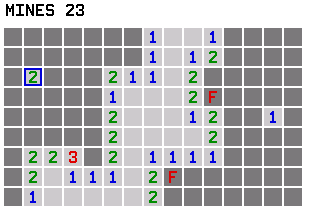
Minesweeper fits the Evo's screen with a 9×15 grid, and your first dig is always safe. Read the numbers, dodge the mines, and race the clock.
Nothing listed in the connect popup: the calculator has to be plugged in and switched on to appear. Wake it up, check the USB cable (charge-only cables won't work), or move to a different port. Close any other tab that's using the calculator.
Have a TI-84 Plus CE? Get Minesweeper for the CE.
By CalcPlex.
Controls
- Arrows move the cursor. It wraps around the edges.
- ENTER digs the square. A flagged square can't be dug until you remove the flag.
- Almost any other key plants a flag, so you don't have to hunt for a special flag button mid-thought. 2nd works, and so does DEL or a digit. Press the same key again to take the flag off. Only the arrows, ENTER and CLEAR don't flag.
- CLEAR leaves the board and goes back to the title screen. Press it again there to quit.
- Left / right arrows on the title screen pick EASY, NORMAL or HARD, and ENTER starts.
- After a win or a loss, ENTER plays again, an arrow goes back to the difficulty screen, and CLEAR goes to the title screen.
Flags are optional
You don't actually need flags to win: the game ends when every safe cell is revealed. Flags are just there to keep your reasoning straight.
Three boards to beat
- EASY: 15 mines
- NORMAL: 25 mines
- HARD: 40 mines
A timer starts on your first dig, and the calculator remembers your best time for each difficulty. Open areas cascade outward instantly when you hit a zero, exactly like the desktop version.