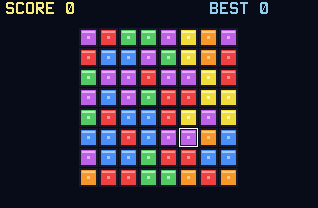
Gems is a match-3 puzzler in the Bejeweled family. Swap two neighboring gems to line up three or more of a color, watch them clear, and let the new gems falling in set off chain reactions.
Nothing listed in the connect popup: the calculator has to be plugged in and switched on to appear. Wake it up, check the USB cable (charge-only cables won't work), or move to a different port. Close any other tab that's using the calculator.
By CalcPlex.
Controls
- Arrows move the cursor. It wraps around the edges.
- ENTER picks up the gem under the cursor. Press ENTER again to put it back down.
- An arrow, while a gem is picked up, swaps it with the neighbor in that direction. If the swap wouldn't make a line, it is refused and you put the gem down, so experimenting never costs you.
- CLEAR ends the game and shows your score. Press it there to go to the title screen, and again to quit.
- On the title screen, the left and right arrows pick EASY, NORMAL or HARD, the up or down arrow opens How to Play, and ENTER starts.
- On the score screen, ENTER plays again and the left or right arrow goes back to the title screen.
Cascades are where the points are
When cleared gems leave gaps, everything falls and fresh gems drop in from the top. New lines that form on the way down clear automatically, and each cascade step multiplies its points. A lucky board can chain three or four deep.
Difficulty is the color count
EASY plays with 5 gem colors, NORMAL with 6, HARD with 7. Fewer colors mean more matches; more colors mean every swap needs a plan. The game ends when no possible swap makes a match, and your best score is saved for each mode.