Simon is the memory game with no place to hide: watch the color sequence flash, echo it back, and every round adds one more step. One miss ends the run.
Nothing listed in the connect popup: the calculator has to be plugged in and switched on to appear. Wake it up, check the USB cable (charge-only cables won't work), or move to a different port. Close any other tab that's using the calculator.
By CalcPlex.
Controls
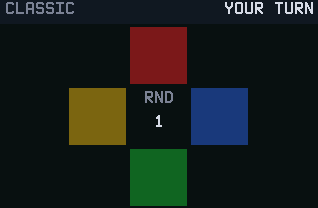
- Up arrow is the red pad, right arrow is blue, down arrow is green, and left arrow is yellow. Repeat the sequence once the pads stop flashing, in the same order (backwards in REVERSE).
- Other keys do nothing while it's your turn.
- CLEAR goes back to the title screen, even while the pads are flashing. Press it again there to quit.
- On the title screen, left / right arrows pick CLASSIC, SPEED or REVERSE and ENTER starts.
- After a miss, ENTER plays again and CLEAR goes back to the title screen.
Pads that match the keypad
The four pads are arranged in a plus, so each one maps to the arrow key pointing at it: up is red, right is blue, down is green, left is yellow. Your fingers learn the layout fast, which is exactly when the game starts speeding up on you: flashes get shorter as the sequence grows.
Three ways to fail
- CLASSIC is the standard game.
- SPEED flashes faster from the start and keeps pushing.
- REVERSE asks for the sequence backwards, which sounds like a small change until you try it.
Each mode saves your best round on the calculator.