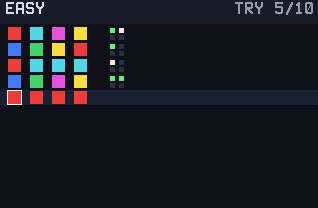
Mastermind is pure deduction: the calculator hides a color code and you have ten guesses to crack it, armed only with the feedback pegs after each try.
Nothing listed in the connect popup: the calculator has to be plugged in and switched on to appear. Wake it up, check the USB cable (charge-only cables won't work), or move to a different port. Close any other tab that's using the calculator.
By CalcPlex.
Controls
- Left / right arrows move between the peg slots in your current row. They wrap around.
- Up / down arrows change the color of the selected slot: up goes to the next color, down to the previous one.
- ENTER submits the row as a guess.
- CLEAR gives up the game and goes back to the title screen. Press it again there to quit.
- On the title screen, the left and right arrows pick EASY, MEDIUM or HARD, the up or down arrow opens How to Play, and ENTER starts.
- When the game ends, ENTER plays again and CLEAR goes back to the title screen.
Reading the feedback
After every guess you get two numbers:
- Green pegs: right color in the right position.
- White pegs: right color, wrong position.
The pegs never tell you which positions, and that gap is the entire game. Good players wring information out of guesses they know are wrong.
Ten guesses
Lose, and the game shows you the code it was hiding, which is somehow worse than losing.
Three tiers
EASY is 4 pegs from 6 colors. MEDIUM keeps 4 pegs but adds two colors. HARD is 5 pegs from 8 colors, and duplicates are allowed, so "each color once" stops being a safe assumption. The calculator saves your fewest-guesses win for each mode.