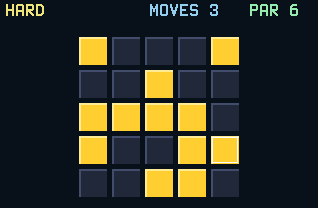
Lights Out has one rule and it's a menace: pressing a light flips it and its four neighbors. Your job is to turn the whole board dark, and every press that fixes one light disturbs the ones around it.
Nothing listed in the connect popup: the calculator has to be plugged in and switched on to appear. Wake it up, check the USB cable (charge-only cables won't work), or move to a different port. Close any other tab that's using the calculator.
By CalcPlex.
Controls
- Arrows move the cursor. It wraps around the edges.
- ENTER presses the light under the cursor, flipping it and its four neighbors.
- 2nd highlights one press from a solution (more below).
- CLEAR leaves the puzzle and goes back to the title screen. Press it again there to quit.
- On the title screen, the left and right arrows pick the size, the up or down arrow opens How to Play, and ENTER starts.
- After a solve, ENTER plays again, the left or right arrow goes back to the title screen, and CLEAR goes there too.
The board knows the best answer
Every puzzle shows a PAR: the true minimum number of presses. Finish and you're rated OPTIMAL, GREAT, or GOOD against it, and every board is guaranteed solvable, so there's no unwinnable grid waiting to waste your time.
When you're stuck
Press 2nd and the game highlights one press from an optimal solution. It's a nudge, not a spoiler: one press of progress, and the rest of the puzzle is still yours.
Sizes
EASY is a 3×3 board (learnable by feel), NORMAL is 4×4, and HARD is 5×5, where intuition dies and technique takes over. Your fewest-presses record is saved per size.