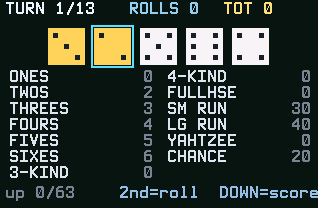
Thirteen turns, five dice, and a scorecard where every box can only be filled once. Yahtzee is really a game about when to settle, and this version makes those decisions easy to see and hard to make.
Nothing listed in the connect popup: the calculator has to be plugged in and switched on to appear. Wake it up, check the USB cable (charge-only cables won't work), or move to a different port. Close any other tab that's using the calculator.
By CalcPlex.
Controls
- Each turn starts with a roll for you. 2nd rolls the dice you haven't held, up to two more times.
- Left / right arrows pick a die and ENTER holds it. Press ENTER again to let it go.
- Down arrow moves down to the scorecard.
- On the scorecard, up / down arrows pick a box and left / right arrows switch columns.
- ENTER on a box banks your dice there. It only works on an empty box.
- 2nd, or the up arrow from the top row of boxes, takes you back to the dice, if you change your mind before banking.
- CLEAR goes back to the title screen. Press it again there to quit. On the game over screen, CLEAR quits.
- On the title screen, ENTER starts and the up or down arrow shows how to play. After a game, ENTER plays again.
A turn
Roll, hold the dice you like, and roll again, up to three rolls total. When you're done, bank the roll into a box. The dice are drawn with real pip faces.
The scorecard does the math
Every open box shows a live preview of what your current dice would score in it. No mental arithmetic, no rulebook: you see instantly that this roll is 22 in Chance but only 9 in Fours, and the real decision (burn a box now or gamble a reroll) is all that's left.
The bonus that decides games
Score 63 or more across the upper section (ones through sixes) and you collect a +35 bonus, which is the margin in most close games. Your best total is saved on the calculator, and a built-in how-to page covers the rest.