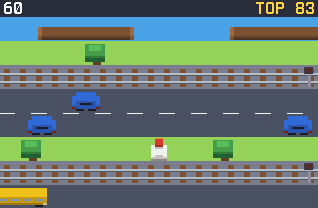
Crossy Road on the TI-84 Evo. Hop forward one row at a time, get past the traffic, ride the logs over the water, and see how far you get before something flattens you.
Nothing listed in the connect popup: the calculator has to be plugged in and switched on to appear. Wake it up, check the USB cable (charge-only cables won't work), or move to a different port. Close any other tab that's using the calculator.
By CalcPlex.
Controls
- Arrows hop: up goes forward, down goes back, left and right step sideways.
- ENTER or 2nd also hops forward. ENTER starts a run from the title screen, and up there opens How to Play.
- CLEAR in the middle of a run goes back to the title screen, and that run doesn't count. Press it there to quit.
- After a run, ENTER goes again and CLEAR goes back to the title screen.
How a run ends
- A car, a bus or a train hits you. When a crossing's light flashes red, the train is two seconds away.
- You land in the water, or a log carries you off the side of the screen.
- You stand still for five seconds, drop off the bottom of the screen, or go back three rows. That's when the eagle shows up.
Your score is the furthest row you reach, and your best is saved on the calculator.