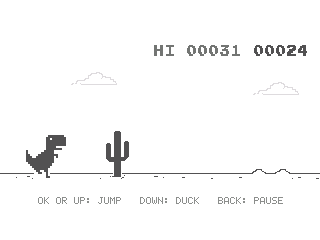
Chrome Dino
By LilyTheCatgirl and Mason363.
This browser can't send to a calculator. Open this page in Chrome or Edge on a computer.
Plug in your NumWorks and click Send to calculator.
For the N0110, N0115 and N0120 with NumWorks software 23.2 or later, in Chrome or Edge.
Description
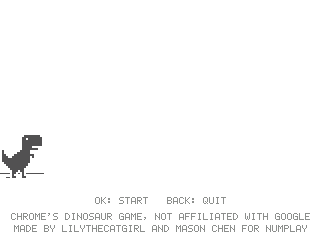
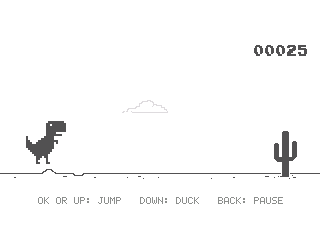
Chrome Dino is the game Chrome shows when you're offline: the T-rex runs, and you jump over cacti and duck under pterodactyls. It keeps getting faster, and every 700 points the screen turns to night for a while.
Your best score is saved.
Controls
- OK/Up: Jump. Hold it for a higher jump.
- Down: Duck, or drop faster in the air.
- EXE: Play again right after a crash.
- Back: Pause.
- Home: Quit.
Credits
- By LilyTheCatgirl and Mason363.
- Based on Chrome's dinosaur game by Google.
- Game rules, numbers and pictures from Chromium's dinosaur game, under Chromium's BSD license (notice below).
- Source code: games/dinorun in NumPlay v1.24.9, under the GPL-3.0 license.
- CalcPlex adds a little startup code to the game as it sends it: App startup code (GPL-3.0).
Chromium's license notice
Copyright 2015 The Chromium Authors
Redistribution and use in source and binary forms, with or without modification, are permitted provided that the following conditions are met:
* Redistributions of source code must retain the above copyright notice, this list of conditions and the following disclaimer. * Redistributions in binary form must reproduce the above copyright notice, this list of conditions and the following disclaimer in the documentation and/or other materials provided with the distribution. * Neither the name of Google LLC nor the names of its contributors may be used to endorse or promote products derived from this software without specific prior written permission.
THIS SOFTWARE IS PROVIDED BY THE COPYRIGHT HOLDERS AND CONTRIBUTORS "AS IS" AND ANY EXPRESS OR IMPLIED WARRANTIES, INCLUDING, BUT NOT LIMITED TO, THE IMPLIED WARRANTIES OF MERCHANTABILITY AND FITNESS FOR A PARTICULAR PURPOSE ARE DISCLAIMED. IN NO EVENT SHALL THE COPYRIGHT OWNER OR CONTRIBUTORS BE LIABLE FOR ANY DIRECT, INDIRECT, INCIDENTAL, SPECIAL, EXEMPLARY, OR CONSEQUENTIAL DAMAGES (INCLUDING, BUT NOT LIMITED TO, PROCUREMENT OF SUBSTITUTE GOODS OR SERVICES; LOSS OF USE, DATA, OR PROFITS; OR BUSINESS INTERRUPTION) HOWEVER CAUSED AND ON ANY THEORY OF LIABILITY, WHETHER IN CONTRACT, STRICT LIABILITY, OR TORT (INCLUDING NEGLIGENCE OR OTHERWISE) ARISING IN ANY WAY OUT OF THE USE OF THIS SOFTWARE, EVEN IF ADVISED OF THE POSSIBILITY OF SUCH DAMAGE.
Report a problemAll releases on GitHub
Installing NumWorks games
- Games run on the NumWorks N0110, N0115 and N0120 with NumWorks software 23.2 or later. The N0100 can't run apps. To see your model and software, open Settings, then About.
- Sending works in Chrome or Edge on a computer. Plug the calculator into the computer, click Send to calculator and pick it in the list that opens.
- When the game is sent, unplug the cable. The game is on the home screen.
- Games are hidden while the calculator is in exam mode, and a reset erases them.