The TI-84 Evo lets you save a function once and evaluate it at any input, so you don't have to retype the expression every time.
Save your function in Y=
- Press
y=to open the function editor. The cursor starts on the Y1 line. (If you already have a function in Y1 from graphing, you can skip this step.) - Type your function. For this example, type 2X+1. The X key is just to the right of
alpha.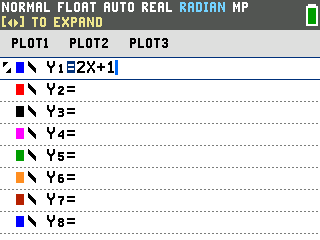
Evaluate from the home screen
Instead of retyping 2(3)+1 every time, you can call Y1 by name. The vars key
is next to clear:
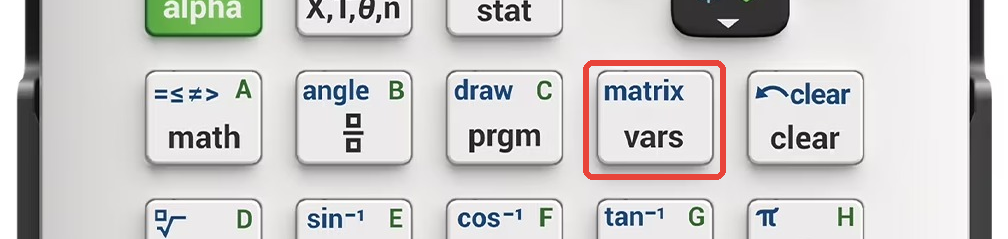
- Press
vars, then arrow right to the Y-VARS tab.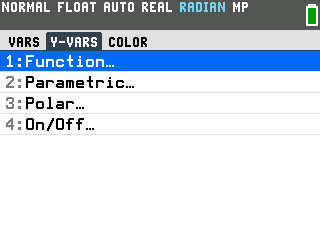
- Press
enterto select 1:Function. A list of function names appears.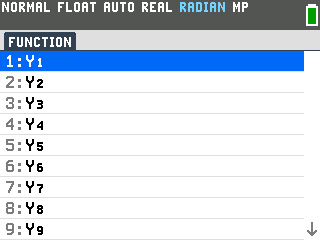
- Press
enteragain to select Y1. It pastes "Y1" onto the entry line. - Type
(then the value you want and pressenter. For x=3, type (3 and pressenter.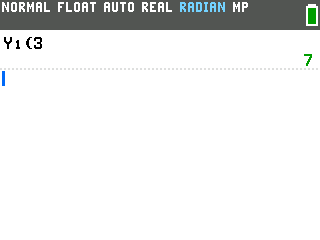
Y1(3) gives 7, which is 2(3)+1. Repeat the same steps to evaluate at any other value.
Good to know
- You don't need to close the parenthesis. Y1(3 then
enterworks the same as Y1(3). Close the parenthesis only when more follows it, like Y1(3)+Y1(5). - For a whole batch of values, use a table. The table evaluates your Y1 function at every x in a range automatically.
- You can evaluate on the graph, too.
Graph the function, then press
2nd+traceand choose 1:value to evaluate at any x you type. - Multiple functions work the same way. Enter a second function on the Y2 line, and call it with Y2(value) through the same VARS menu.