Jailbreaking your TI-84 Plus CE with arTIfiCE lets you run assembly programs and games.
Connect your calculator
Plug your TI-84 Plus CE into this computer. We check your calculator and install the right jailbreak.
Manual steps with TI Connect CE
What you need
- The USB cable that came with the calculator. Some cables only charge and can't send files.
- TI Connect CE, TI's program for Windows and Mac.
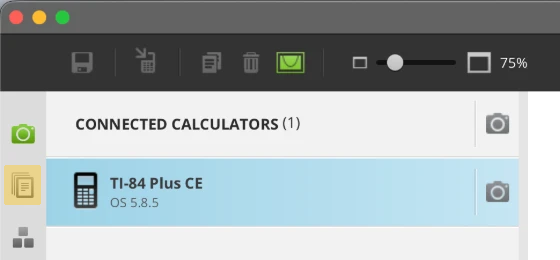
To send a file: plug in the calculator, turn it on and open TI Connect CE. Click the second icon down in the left sidebar, the stack of pages under the green camera. Drag the file into that window, then send it from the box that opens.
Steps for your OS version
Find your OS version
- Press 2nd, then +. The MEMORY menu opens.
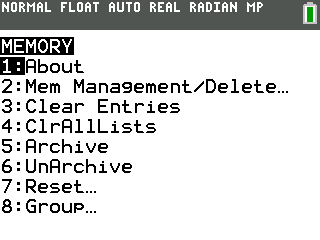
- Press 1 for About. The version is under the calculator's name.
Only the first three numbers count: 5.8.5.0074 is 5.8.5.
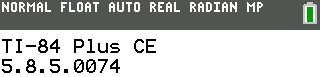
TI Connect CE shows it too, under the calculator's name (see its window above).
Pick your version to see its steps.
OS 5.2 or earlier: no jailbreak needed
Assembly games already run on these versions. Send games from the games page and start them like this.
- Press 2nd, then 0 for the catalog.
- Arrow down to Asm( and press enter.
- Press prgm, arrow to SNAKE, then press enter. The home screen reads Asm(prgmSNAKE.
- Press enter.
- The game starts.
You're done when your game starts this way.
OS 5.3 and 5.4: no jailbreak needed
Assembly games already run on these versions. Send games from the games page and start them from the prgm menu.
- Press prgm, arrow to your game, then press enter. If your calculator's model name ends in Python, choose TI-Basic first.
- Its name is on the home screen. Press enter again.
- The game starts.
You're done when your game starts this way.
OS 5.5 to 5.8.4: arTIfiCE v2.1
- Send arTIfiCE_v2.1.8xp and a game with TI Connect CE. arTIfiCE lists your games, so send
at least one with it. Get one from the games page.
Download arTIfiCE_v2.1.8xp
arTIfiCE by YvanTT. GPLv3. Original release page
- Run arTIfiCE. It's program A.
- Press prgm, then press enter on A. If your calculator's model name ends in Python, choose TI-Basic first.
- prgmA is on the home screen. Press enter again.
- arTIfiCE lists your games. Arrow to one and press enter.
- The game starts.
You're done when arTIfiCE lists your games and the one you pick starts.
Whenever you want to play: prgm, run A, pick the game. Press mode to leave arTIfiCE.
OS 5.8.5: arTIfiCE v3
Version 3 adds an app called AsmHook2, which lets games start from the prgm menu.
- Check for Inequalz. Press apps and look for Inequalz in the list. If it isn't there, download the Inequality Graphing app from TI's website and send it with TI Connect CE first.
- Clear the RAM.
This erases every program and variable that isn't archived. Archive or back up anything you want to keep first.
- Press 2nd, then +.
- Press 7 for Reset.
- Press 1 for All RAM.
- To confirm, press 2 for Reset (1 is No).
- The RAM is clear.
- Send arTIfiCE.8xp with TI Connect CE. Only this file for now.
Download arTIfiCE.8xp
arTIfiCE by YvanTT. GPLv3. Original release page
- Open Inequalz.
- Press apps, then arrow down to Inequalz.
- Press enter.
- Press any key to clear the splash screen.
- Stay on this Y= screen.
- Send INEQUVAR.8xv with TI Connect CE while Inequalz is open on its Y= screen. The calculator
restarts on its own when it arrives. That's the install finishing.
Download INEQUVAR.8xv
arTIfiCE by YvanTT. GPLv3. Original release page
- Launch AsmHook2.
- Once the calculator has restarted, press apps, then arrow to AsmHook2.
- Press enter.
- It reports Installation successful. Press clear until the home screen shows, or the calculator won't take the game.
- Start a game. Send one from the games page,
then start it from the prgm menu.
- Press prgm, arrow to your game, then press enter. If your calculator's model name ends in Python, choose TI-Basic first.
- Its name is on the home screen. Press enter again.
- The game starts.
You're done when AsmHook2 reports Installation successful and a game starts from the prgm menu.
Good to know
- Launch AsmHook2 once and it stays through restarts. After a RAM reset, launch it again.
- If Inequalz later shows CONFLICTING APPS, choose option 2, then leave Inequalz and launch AsmHook2 again.
Frequently asked questions
Will this break my calculator? Can I still use it at school?
The jailbreak is just a program on your calculator. The calculator will still function normally,
and you can always remove the jailbreak later.
How do I remove it?
Reset all memory.
That erases everything on the calculator, so copy off anything you want to keep first.