The TI-84 Evo has dedicated sin, cos, and tan keys, so evaluating a trig function takes one keypress and the angle.
Evaluate sine, cosine, or tangent
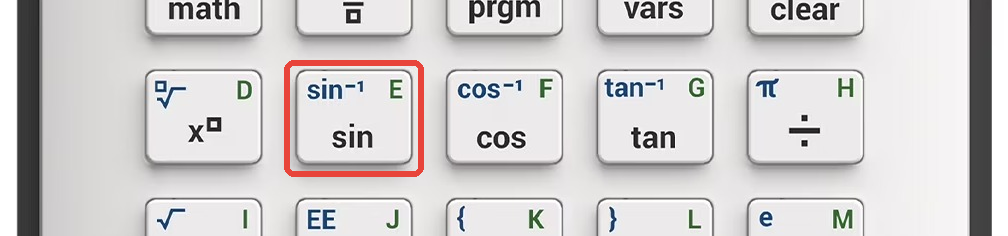
The sin key is on the left side of the keyboard, with cos and tan right next to it.
- Check the status bar. The word DEGREE or RADIAN in the top row tells the calculator how to read the angle you type. Most classes work in degrees. If yours says RADIAN, switch it first: how to put the TI-84 Evo in degree mode.
- Press
sin, type the angle, and pressenter. For sin(30), press sin, then 3, 0, enter. The answer comes back as 1/2.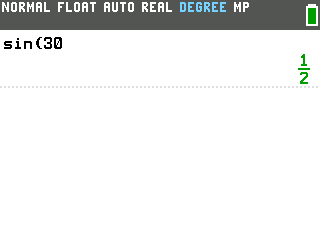
- Cosine and tangent work the same way. Press the cos or tan key instead of sin,
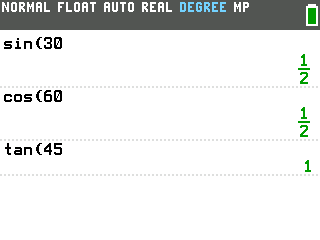
type the angle, and press enter. cos(60) gives 1/2, and tan(45) gives 1.
Find an angle with inverse trig
To go the other direction (you know the ratio and need the angle), use the inverse functions printed in blue above the sin, cos, and tan keys. These are also called arc sine, arc cosine, and arc tangent, and written sin-1, cos-1, tan-1 on the keyboard.
- Press
2nd, thensin. sin-1( appears on the entry line. Type the value and press enter. sin-1(.5) gives 30, confirming that the angle whose sine is 0.5 is 30 degrees.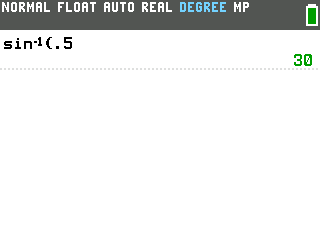
- cos-1 and tan-1 follow the same pattern: press
2ndthen the cos or tan key.
Good to know
- You don't need to close the parenthesis. sin(30 then enter works the same as sin(30). Close a parenthesis only when the expression continues past it, like sin(30)+1.
- The angle mode matters. sin(30) gives 0.5 in degree mode but -0.9880316241 in radian mode, because the calculator reads 30 as 30 radians. If your answer looks wrong, check the status bar. See our degree mode tutorial for more detail.
- Not every angle has a trig value. tan(90) is undefined (the tangent at 90 degrees shoots off to infinity), so the calculator returns an error.