The TI-84 Evo does its trig in radians until you tell it otherwise, and the status bar at the top of the screen always shows which mode you're in.
Switch to degree mode
The setting lives behind the mode key, next to 2nd:
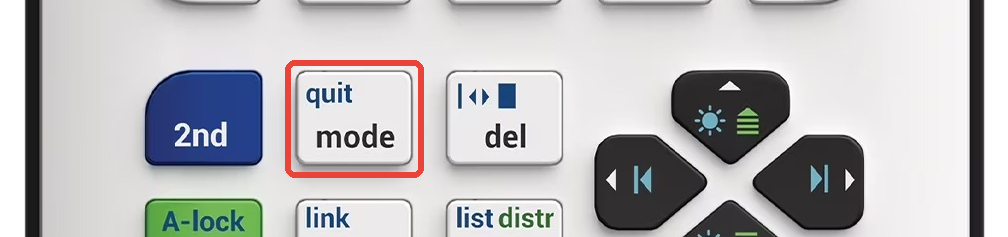
- Press
mode. The mode menu opens, with each row's active setting shown in a dark box (the bright blue highlight is just the cursor).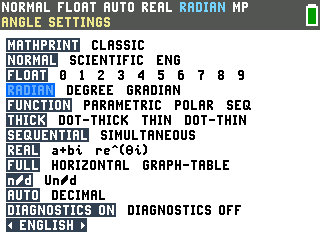
- Arrow to DEGREE on the row that reads RADIAN DEGREE GRADIAN
and press
enter. The status bar switches to DEGREE right away.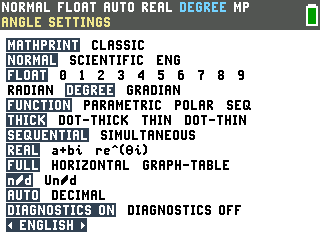
- Press
clearto get back to the home screen.
Switching back is the same trip: mode, arrow to RADIAN,
enter, clear.
What actually changes
The angle mode decides how sin, cos, and tan read their input. Same keystrokes, both modes: sin(30) is -0.9880316241 in radian mode and ½ in degree mode.
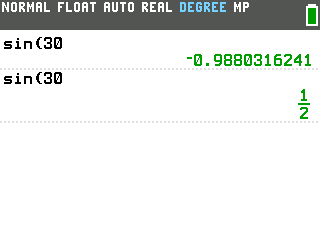
Answers like ½ come back as fractions; the answer toggle key flips them to decimals (covered in our fractions tutorial).
Use degrees for one calculation without switching
If you'd rather stay in radian mode, you can mark a single angle as degrees. Type the angle,
then press 2nd and the fraction key (it has angle printed above it).
Option 1 is the degree symbol; press enter to paste it.
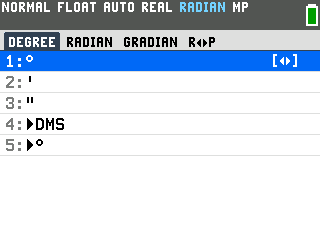
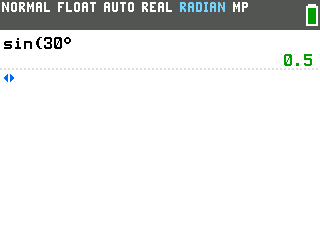
The ° overrides the mode for just that number, so sin(30°) gives 0.5 with RADIAN still in the status bar:
Good to know
- You don't have to close parentheses. sin(30 then
enterworks exactly like sin(30), which is why our screenshots leave them open. Close a parenthesis only when more follows it, like sin(30)+1. - GRADIAN is the third option you'll probably never need (100 gradians to a right angle). If your status bar ever says it, now you know where to fix it.
- The mode only affects angle functions like sin, cos, and tan. Regular arithmetic doesn't care.
- Resetting the calculator puts it back in radian mode, the default. If your trig answers change after a reset, check the status bar first.