The TI-84 Evo has a System Solver app built in that works out a whole system of equations on its own.
Open the System Solver
- Press
onfor the app grid, and arrow onto the two-stacked-equations icon. The bar along the top reads SYSTEM SOLVER when you have the right one. If the icon is missing, restoring your missing apps brings it back.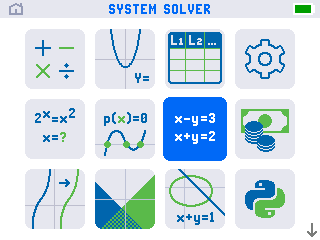
- Press
enter. The SETUP screen comes up. Leave EQUATIONS and UNKNOWNS on 2 for a two-equation system.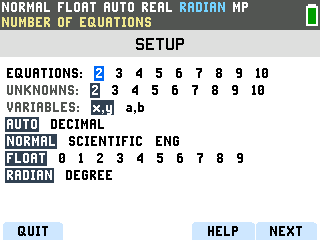
- Press NEXT. The five labels along the bottom of the screen belong to the top-row
f1 to f5 keys. NEXT sits above
graph.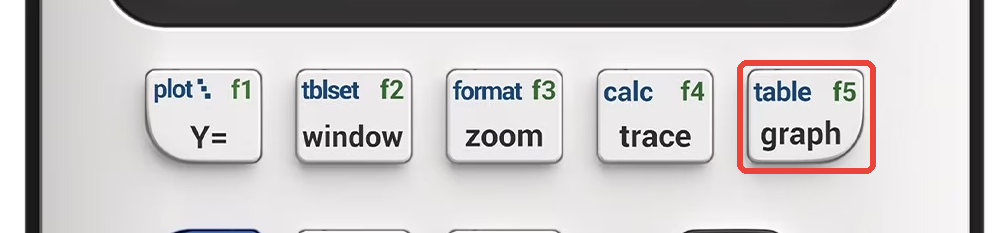
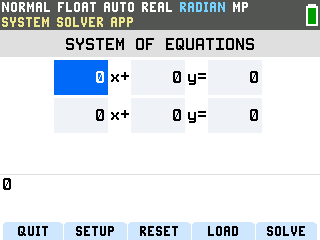
Enter the system and solve
This walk-through solves 2x + 3y = 12 and x − y = 1.
- Type the first coefficient. Press 2. Digits land on the entry line
at the bottom of the screen. Press
enterand the 2 drops into the box, and the highlight jumps to the sign.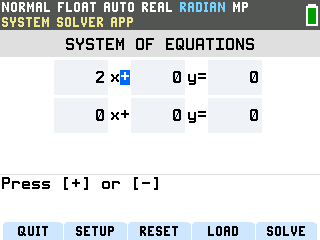
- Set the sign to plus. The signs between the terms are their own boxes, and the
prompt at the bottom says Press [+] or [-]. Press
+, thenenter. - Finish the first equation. Press 3,
enterfor the y, then 1, 2,enterfor the 12. The top line now reads 2x + 3y = 12. - Start the second equation. Press 1,
enterfor its x. This sign is a minus, so press the−subtraction key, not the(-)negative key (which does nothing here), thenenter. - Finish the second equation. Press 1,
enterfor the y, then 1,enterfor the 1 on the right.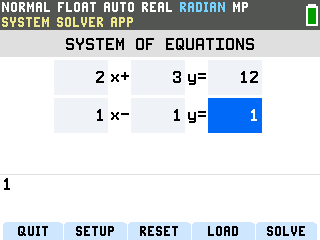
- Press SOLVE (the
graphkey again). The answer arrives on its own screen: x = 3 and y = 2.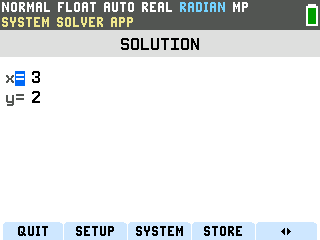
More than two equations
The SETUP screen goes up to 10 equations and 10 unknowns. Press SETUP (the window key),
arrow the EQUATIONS and UNKNOWNS rows to 3, and the variables become x, y, z. Press NEXT
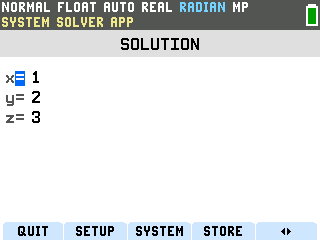
and the grid grows a z column that fills in the same way. Here is x + y + z = 6, x − y + z = 2,
2x + y − z = 1 solved in one press:
Good to know
- When there is no single answer. Parallel lines that never cross get
No solution found. Two copies of the same line get a solution set in terms of one
variable, like x = 2 − y.
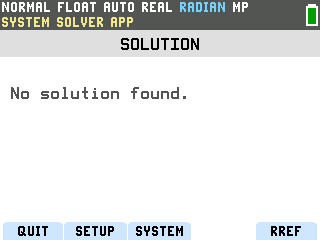
- Change a number without starting over. SYSTEM (the
zoomkey) on the answer screen goes back to the equations with your numbers still in place, so you can edit one and press SOLVE again. RESET on the grid, then 1:Reset Defaults, clears everything back to zero. - Solving one polynomial instead of a system. For a single quadratic or cubic, the grid has a separate app: how to use the Polynomial Root Finder on the TI-84 Evo.
- Leaving the app. QUIT sits on the
y=key and drops you back on the home screen. From thereonflips between the home screen and the app grid.