The TI-84 Evo builds a base slot right into its log key, so you can take a logarithm in any base
without a change-of-base formula. Base 2, base 5, and base 10 all work the same way.
Take a log in any base
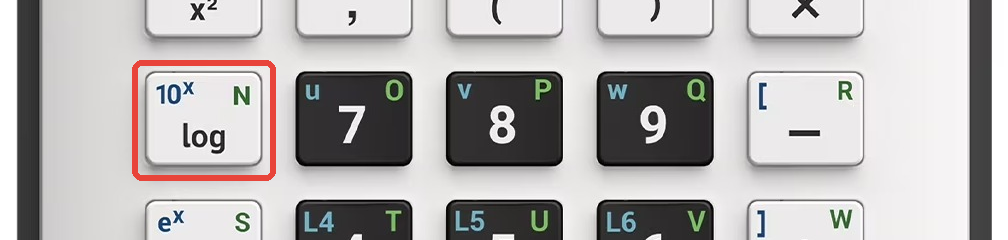
Press the log key. It's on the left side of the keyboard, in the same row as
the 7 key.
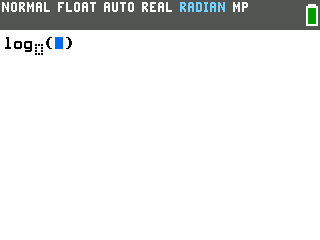
Up comes a template with the cursor inside the parentheses and a small empty box tucked under the
word log. That box is the base.
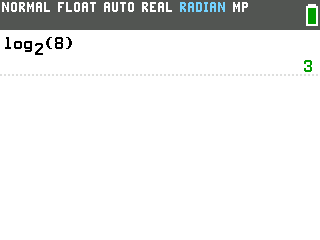
Fill in the base, then the number. Press the left arrow to move into the base
box and type the base, say 2. Press the right arrow to come back inside the
parentheses and type the number, 8. Press enter, and the calculator
reads it back as log₂(8) and answers 3.
The answer doesn't have to come out even. Ask for log₂(10) and you get
3.321928..., just like any other decimal result.
Common log (base 10)
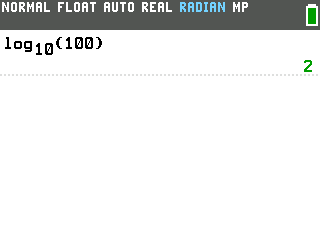
Leave the base box empty and the Evo treats it as base 10, the common log. Press log,
type the number, and press enter. The calculator fills in the 10 for you, so
log(100) comes back as log₁₀(100) = 2.
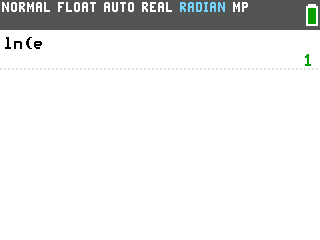
Natural log (base e)
The ln key, right below log, is the natural log: a logarithm with base
e. It has no base box because the base is always e. Take the natural log of
e itself to see it (e is 2nd then the times key), and
ln(e) returns 1.
Good to know
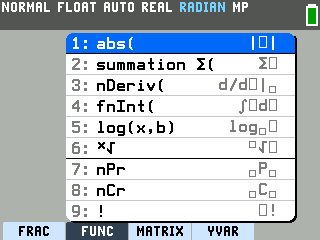
Coming from an older TI-84? On other models the base log hides in a shortcut
menu: press alpha then window and choose option 5: log(x,b).
It's on the Evo too, but it drops in the very same base template as the log key, so you never have
to dig for it. (The old comma form, log(8,2), isn't used here.)
The base can be a decimal. Any positive base fits in the box, not just whole
numbers, so log0.5(8) answers -3.
Reading a function graph instead? A logarithm is also just a function you can
plot. See how to graph a function on the TI-84 Evo to draw
one and trace its values.