The TI-84 Evo has built-in permutation and combination commands, nPr and nCr, in the PROB tab of the MATH menu.
Enter a permutation (nPr)
Use nPr when the order matters, like picking a President and a Vice President from a group of 5 people.
- Press the MATH key. Arrow right to the PROB tab.
- Choose nPr. Arrow down to nPr, item 2, and press
enter.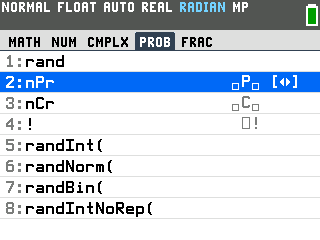
- Fill in the two boxes. Type your first number, 5, in the left box, press the right arrow to move to the second box, then type your second number, 2. The line reads 5P2.
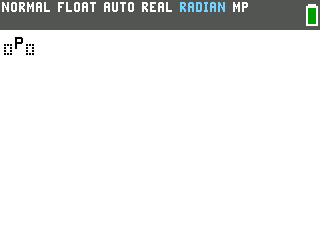
- Press
enterfor the answer. There are 20 ways to pick a President and VP.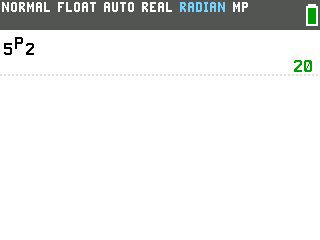
Enter a combination (nCr)
Use nCr when the order does not matter, like picking a 2-person committee from that same group of 5.
nCr works the same way, one row down. Press the MATH key, arrow right to PROB, then arrow down to nCr, item 3. Fill the two boxes the same way: type 5, press the right arrow, type 2, and press enter.
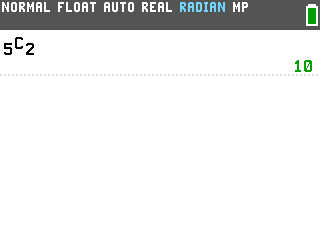
The answer, 10, is smaller than the 20 permutations above, because a committee does not care who was picked first.
A keyboard shortcut
You can also reach these commands without the MATH menu. Press alpha, then window, to open the FUNC shortcut menu. nPr is item 7 and nCr is item 8.
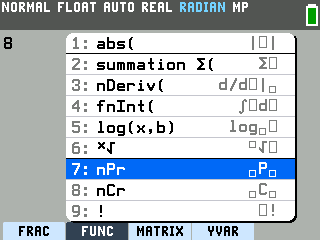
Pressing the up arrow from the top wraps to the bottom, a quick route to both. Highlight the one you want, press enter, and fill in the boxes the same way.
Good to know
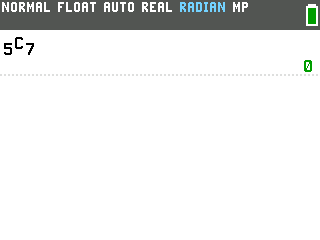
- Choosing more than you have gives 0. Ask for 5 nCr 7, choosing 7 from a group of 5, and the calculator returns 0, because there is no way to do it.
- Both numbers have to be whole numbers. A decimal like 5.5 returns ERROR: DOMAIN.
- The factorial command sits right here too. The exclamation point is item 4 in the same PROB menu, one row below nCr. See How to Do Factorials on the TI-84 Evo.