An arithmetic sequence climbs by the same amount every term, and the TI-84 Evo lists its terms straight from the formula for the nth term using the seq command, tucked in the OPS tab of the LIST menu.
List the terms
- Turn the sequence into a formula. Find the first term and the common difference, which is how much the sequence climbs from one term to the next. The sequence 3, 7, 11, 15 starts at 3 and climbs by 4, so its nth term is 3 + 4(n − 1).
- Open the LIST menu and go to OPS. LIST is the blue label above the
statkey, so press2ndthenstat, and arrow right to the OPS tab. The sequence command is item 5, seq(.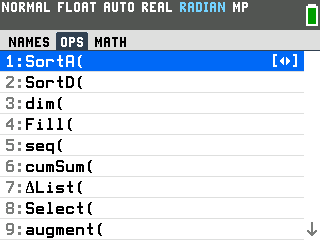
- Fill in the Seq screen. Choosing seq( opens a screen with five blanks, and
entermoves down from one to the next:- Expr is the formula for the nth term: type 3 + 4(X − 1) using the X key.
- Variable is the letter the formula counts with: X.
- start and end are the first and last term you want, 1 and 10, so this lists the first ten terms.
- step stays at 1 to count one term at a time.
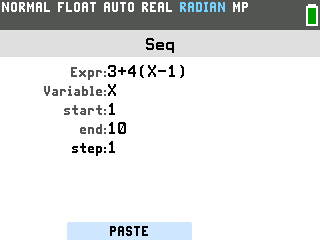
- Press the key below PASTE. PASTE sits along the bottom of the screen, and the key directly below it is
zoom. Pressingenterhere only moves you down a blank, so it is the zoom key that hands the finished command back to the home screen.
- Press
enterfor the terms. The answer is the ten terms in braces, and the first four — 3, 7, 11, 15 — match the sequence you started with, so the formula is right.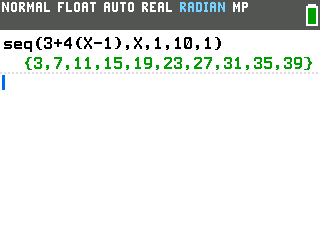
Find a specific term
The same formula gives any term you want without listing everything before it. To find the 20th term, you only change where the count starts and ends.
- Reopen the Seq screen. Press
2nd,stat, arrow right to OPS, and choose seq( again. Every blank is still filled in from before, so the formula is waiting for you. - Set start and end to 20. Arrow down to start and type 20, then press
enterand type 20 for end as well. Asking for term 20 through term 20 returns that single term.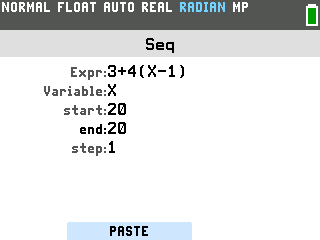
- Paste and press
enter. Presszoomfor PASTE, thenenter. The 20th term is 79.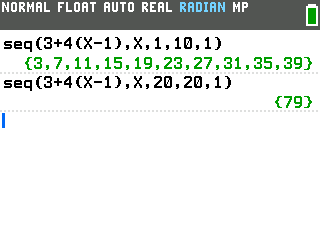
Good to know
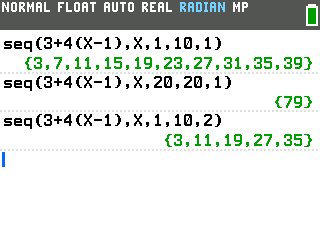
- step is not the common difference. The step blank controls how the counter climbs, not how the sequence grows. Setting it to 2 counts 1, 3, 5, 7, 9 and returns every other term, {3, 11, 19, 27, 35}. The common difference stays in the formula, so leave step at 1 unless you want terms skipped.
- For a sequence that falls, use the negative key. If the common difference is negative — a sequence like 3, −2, −7, −12 that drops by 5 — enter it with the
(−)negative key, not the−subtraction key, or the calculator returns a syntax error. - Adding the terms up is a different task. The total of a sequence's terms is its arithmetic series, and the calculator has a separate summation command for that.