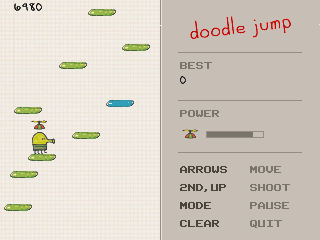
Doodle Jump
- TI-84 Plus CE
- Game
By Pixple.
Plug in your TI-84 Plus CE, turn it on, and click Connect to send this game.
In the list that opens, click your calculator, then Connect. Use the cable that came with your calculator. Some cables only charge.
Sending straight to your calculator works in Chrome or Edge on a computer.
Description
Bounce your way up a tower of platforms that never ends, and see how far you get before you miss one. Springs, jetpacks and propeller hats throw you up whole screens at a time. Monsters, UFOs and black holes end a run, so shoot them on the way up or land on their heads.
Controls
- Left and right: steer. Hold a direction to build speed, and let go to drift. Leave one side of the screen and you come back on the other.
- Up, 2nd or alpha: shoot straight up. Shots aim themselves at anything above you.
- enter: start a run, and start the next one. 2nd and alpha work too.
- mode: pause. clear: quit.