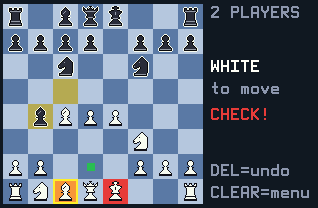
Full chess on the TI-84 Evo, castling and en passant included. Play the CPU as White or Black at one of three levels, or play a friend on one calculator.
Nothing listed in the connect popup: the calculator has to be plugged in and switched on to appear. Wake it up, check the USB cable (charge-only cables won't work), or move to a different port. Close any other tab that's using the calculator.
Have a TI-84 Plus CE? Get Chess for the CE.
By CalcPlex.
Controls
- Arrows move the yellow cursor around the board.
- ENTER on one of your pieces picks it up and marks the squares it can move to in green. ENTER on a marked square moves it there.
- When a pawn reaches the far side, left and right pick the piece it becomes and ENTER takes it.
- DEL takes back a move, and against the CPU its reply too.
- CLEAR goes back to the title screen. Press it there to quit.
- On the title screen, left and right pick the CPU's level or 2 PLAYERS, up and down pick White or Black, and ENTER starts.
The CPU
Each level looks further ahead than the one before. HARD looks up to two moves ahead for each side and can take up to about eight seconds a move.
Playing Black turns the board around so your pieces are at the bottom.