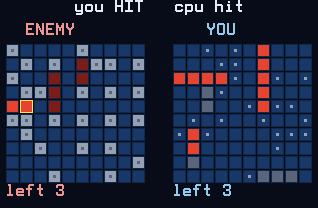
Battleship against a CPU admiral. Both fleets of five ships are placed automatically, then you trade salvos: move the cursor on the enemy grid, press ENTER to fire, and watch your own grid take return fire on the right.
Nothing listed in the connect popup: the calculator has to be plugged in and switched on to appear. Wake it up, check the USB cable (charge-only cables won't work), or move to a different port. Close any other tab that's using the calculator.
By CalcPlex.
Controls
- Arrows move the cursor around the enemy grid. It wraps from one edge to the other.
- ENTER fires at the square. The CPU fires back right away. A square you already shot does nothing.
- CLEAR leaves the match and goes back to the title screen. Press it again there to quit.
- Left / right arrows on the title screen pick EASY, NORMAL or HARD, ENTER starts, and the up or down arrow opens How to Play.
- After a match, ENTER plays again, the left or right arrow goes back to the difficulty menu, and CLEAR goes to the title screen.
The AI hunts like a person
Difficulty changes how the CPU searches, not how lucky it gets:
- EASY fires at random.
- NORMAL works the cells around a hit, and once two hits line up it locks onto the ship's axis and stops wasting shots off-line.
- HARD adds parity hunting: while searching it only checks every other cell, because even the smallest ship must cover one of them.
HARD sinks a fleet in roughly 59 shots of 100 where random firing needs about 95. First to sink all five ships wins, and your win count is saved per difficulty.