The TI-84 Evo's Finance app has a TVM Solver that works out a loan payment, an interest rate, a present or future value, or the number of payments, as soon as you fill in the rest.
Open the TVM Solver
- Press
onfor the app grid, and arrow onto the green money icon. The bar along the top names whatever is highlighted, so it reads FINANCE when you have the right one.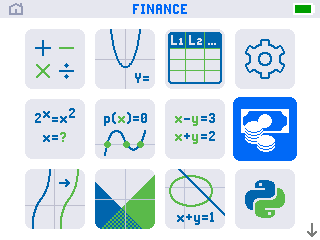
- Press
enterto open it. The app starts on a list of finance tools with TVM Solver at the top. TVM is short for time value of money.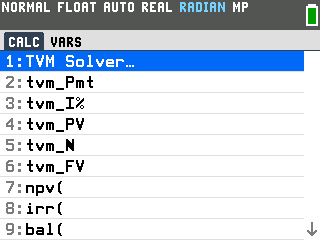
- Press
enteragain to open the solver. Each line is one part of a money problem. You fill in every line except the one you want the calculator to find.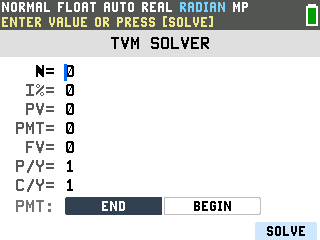
Fill in the numbers you know
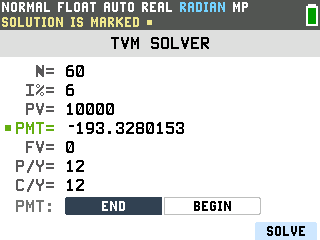
This example finds the monthly payment on a $10,000 loan at 6% interest, paid off over 5
years. Type each value and press enter to move down to the next line.
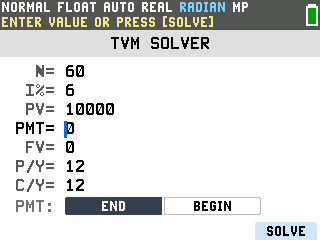
- N is the total number of payments. Five years of monthly payments is 60, so type 60.
- I% is the yearly interest rate as a plain number: type 6, not 0.06 or 6%.
- PV is the present value, the size of the loan: 10000. It is positive because the bank hands that money to you.
- PMT is the payment. Leave it at 0, since this is the value you are solving for.
- FV is the future value, what is still owed at the very end. A loan you pay off completely finishes at 0.
- P/Y is the number of payments a year, so type 12 for monthly. C/Y, how many times interest compounds a year, fills in with the same 12 on its own once you set P/Y, so you can leave it.
- PMT: END stays selected, which places each payment at the end of the month, the way ordinary loans work.
Solve for the payment
- Arrow up to the PMT line. The line you left blank is the one to solve for, and moving
the cursor onto it is how you tell the calculator which value is missing.
- Press SOLVE with the
graphkey. The SOLVE label sits at the bottom right of the screen, just above the graph key. The payment appears on the PMT line as −193.33, with a small square beside it and SOLUTION IS MARKED along the top. It comes back negative because it is money leaving your pocket each month.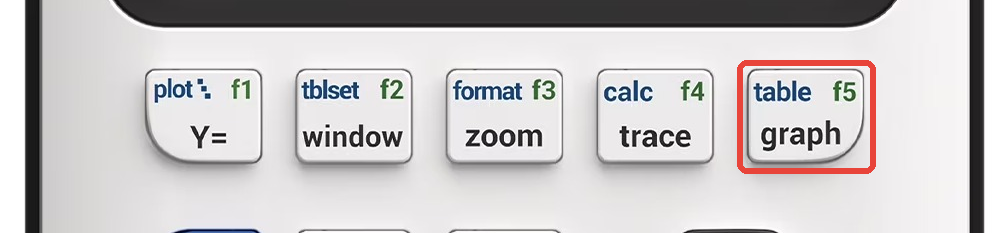
Good to know
- Solve for any line, not just the payment. The solver finds whichever value you leave
blank. Enter a deposit as the present value, leave FV blank, and the same screen answers a savings
question instead: $1,000 set aside at 5% for 10 years, typed as
−1000since it leaves your pocket, grows to 1,628.89.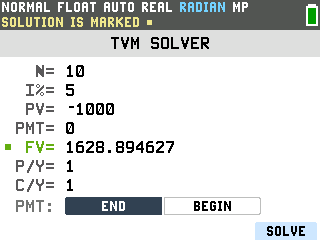
- The sign tells you the direction. Money you receive is positive, money you pay is
negative. The loan amount went in positive and the payment came back negative. Type a negative with the
negative key, the one marked
(-), not the subtraction key: the subtraction key shows the same minus on screen but gives a syntax error when you solve. If an answer's sign looks backwards, check which amounts you entered as negative. - P/Y and C/Y. P/Y is payments per year, 12 for monthly and 1 for yearly. Once you set it, C/Y (how often interest compounds a year) fills in with the same number on its own, so you only touch C/Y by hand when interest compounds on a different schedule than the payments.
- END and BEGIN. The bottom line switches between a payment at the end of each period, normal for loans, and one at the beginning, used for some leases and annuities. Leave it on END unless a problem tells you otherwise.
- The menu holds more than the solver. The finance list you passed through also carries
npv(andirr(for cash-flow problems andbal(for a loan's balance partway through. Those are typed on the home screen rather than filled into a form.