The TI-84 Evo can save a number into a letter, A through Z, and reuse it in later
calculations. The key that does it is sto→, down in the bottom-left corner
above on.
Store a value in a variable
- Type the number you want to save, for example 5.
- Press
sto→. It drops a→arrow in after your number.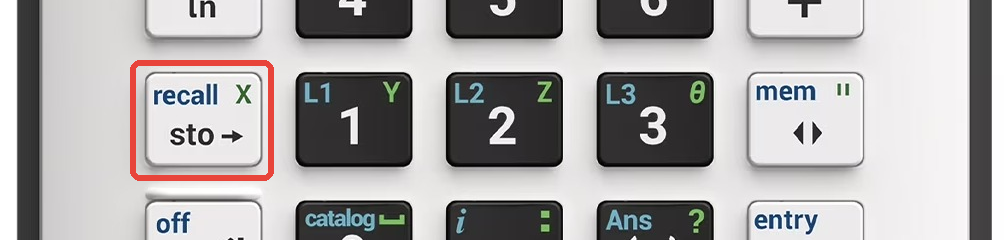
- Press
alpha, then a letter key. Letters are the green labels above the keys. A is the green letter abovemath, so pressalphathenmathand the line reads 5→A.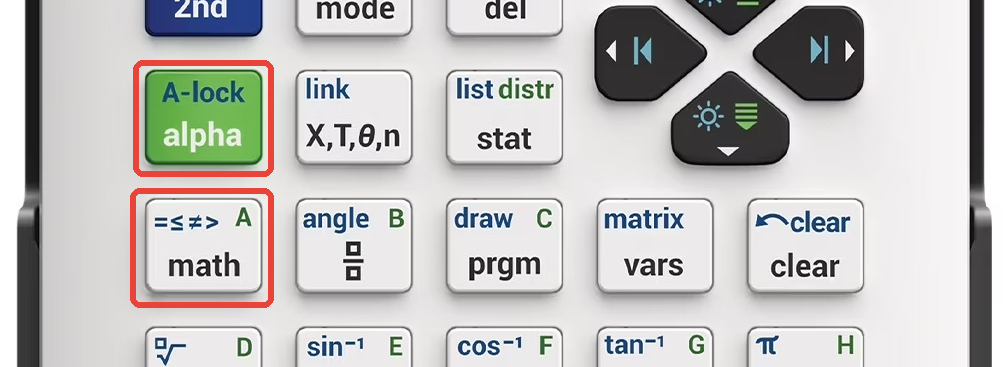
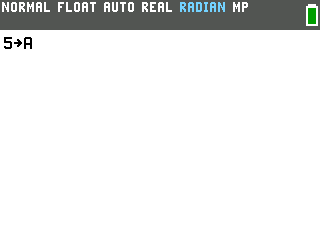
- Press
enter. The 5 is now stored in A, and the calculator echoes it back on the right.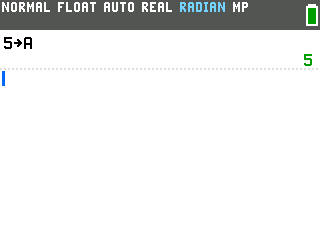
Don't skip that alpha press. The letter keys type numbers and menus until you hit
alpha first, so pressing math straight after sto→ just
opens the MATH menu instead of typing A.
Recall it and use it
Once a value is stored, type the letter anywhere you would type a number: press
alpha then the letter, and the calculator uses whatever you saved.
- Type A on its own and press
enterto read the value back: 5. - Drop A into an expression like A+10 and it computes with the stored value: 15.
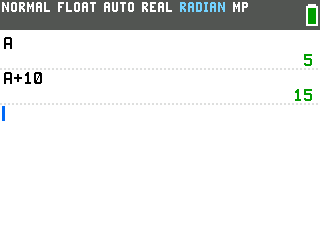
Storing a new number into the same letter overwrites the old one, so A stays 5 until you replace it.
Good to know
- X skips the alpha step. The
X,T,θ,nkey (just right ofalpha) types X on its own, since X is the variable graphs use. Handy when you're storing something you'll graph later. 2ndthensto→is Rcl. Instead of referencing a letter live, Rcl pastes its stored value onto the entry line so you can edit it. Press2nd,sto→, then the letter, andenter.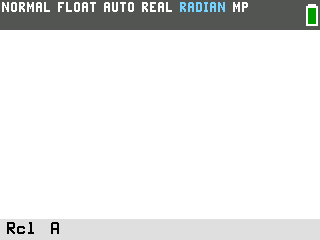
- Any letter from A to Z works, plus
θ. Pick one you'll remember. - Stored values stick around. A variable keeps its value until you overwrite it or clear the calculator's memory, so what you set today is still there tomorrow. Resetting the RAM wipes them all back to zero.