The TI-84 Evo has a dedicated key for scientific notation, labeled EE, so you can enter a number like 3×10⁸ without typing out the times-ten-to-a-power part by hand. A display setting can also make every answer come back in scientific notation.
Enter a number in scientific notation
The EE key is the second function of the comma key, in the right-hand column, so you reach it by pressing 2nd first:
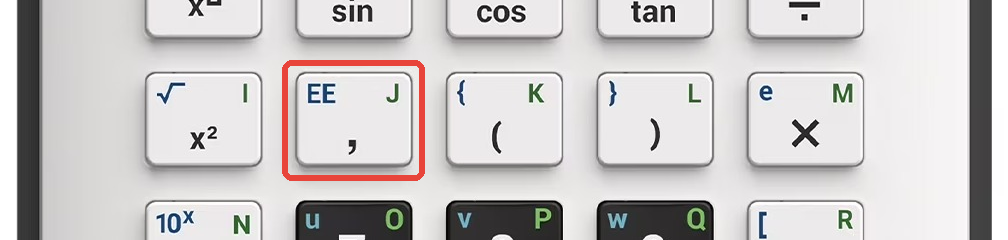
- Type the number, then the E. For 3×10⁸, press
3, then2ndand the comma key for a small E, then the power,8. The line reads 3E8, and that E means "times ten to the".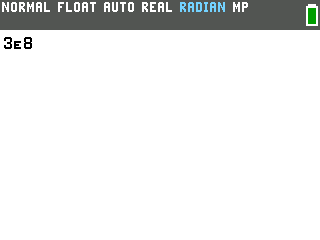
- Press
enter. The calculator shows the number written out in full: 300000000. That is exactly what 3E8 stands for, a 3 followed by eight zeros.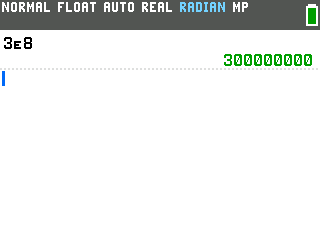
Show every answer in scientific notation
The EE key handles what you type in. To make the calculator hand answers back in scientific notation, switch the display mode.
- Press
mode, in the top-left corner just right of the2ndkey. The mode menu opens, with each row's active setting shown in a dark box.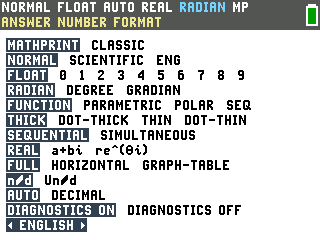
- Arrow to
SCIENTIFICon the second row, which reads NORMAL SCIENTIFIC ENG, and pressenter. The status bar in the top-left switches from NORMAL to SCI right away.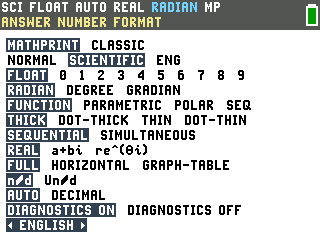
- Press
clearto return to the home screen. Every answer now comes back in scientific notation, so typing 300000000 gives 3E8.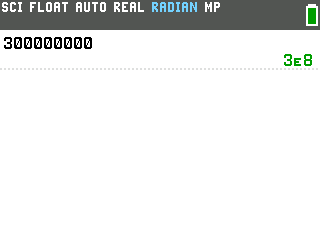
To go back to ordinary numbers, make the same trip and choose NORMAL on that row.
Good to know
- Small numbers use the negative key. For a power like 10-4, press the
(-)key on the bottom row for the exponent, not the subtraction key. So 5,EE,(-), 4 gives 5E-4, which is 0.0005.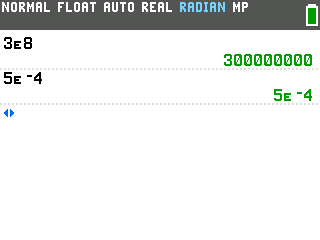
- NORMAL mode reaches for scientific notation on its own. A result that is very large or very small comes back in scientific form even in NORMAL mode, which is why you sometimes see an E before you change any setting at all.
- ENG is engineering notation. The third choice on that row keeps the power in multiples of three, so 240000 reads as 240E3. That lines up with the unit prefixes kilo, mega, and giga.
- Resetting the calculator puts the display back to NORMAL, the default. If your answers stop showing in scientific notation after a reset, that is where to switch it back on.