By default, the TI-84 Evo returns ERROR: NONREAL ANSWER for the square root of a negative number. Switching one MODE setting, a+bi, fixes that and turns on full complex-number support.
Switch to a+bi mode
Ask for the square root of -1 in the calculator's default REAL mode and it stops with the error instead of an answer.
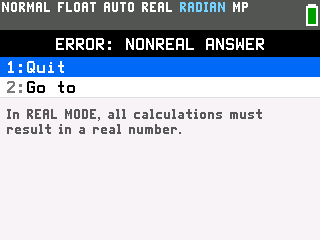
- Press
modeand arrow down to the row that reads REAL a+bi re^(θi). The dark bar at the top names it NUMBER TYPE: REAL/COMPLEX.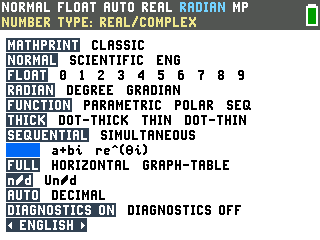
- Arrow right to
a+biand pressenter. The status bar in the top-left switches from REAL to a+bi.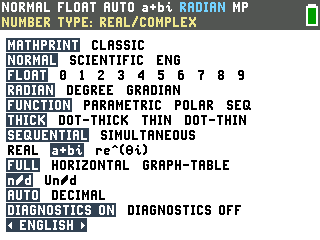
- Press
clearto return to the home screen, then try the square root of -1 again. This time it returns i.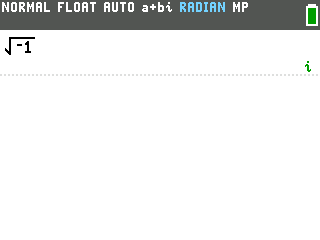
Type i and do complex arithmetic
The imaginary unit i is the second function of the decimal point key, along the bottom row, so you reach it by pressing 2nd first:

- Enter a complex expression. For (3+4i)+(1-2i), press
(3+4, then2ndand the decimal key to get i, then). Build the second number the same way after a+. - Press
enter. The calculator adds the real parts and the imaginary parts separately and returns 4+2i.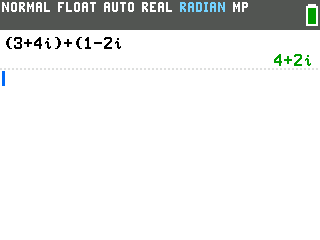
It multiplies complex numbers too, applying i2 = -1 on its own: (3+4i)(1-2i) comes back as 11-2i.
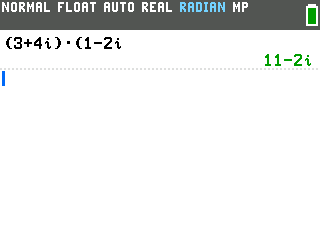
Arithmetic with an i you typed yourself actually works even back in REAL mode. The a+bi setting matters when the calculator has to come up with the imaginary part on its own, like those square roots of negatives.
Good to know
- The MATH menu has a CMPLX tab of complex-number tools. Press
mathand arrow right to CMPLX. You get conj( for the conjugate, abs( for the magnitude, plus real(, imag(, and angle(. For example, conj(3+4i) is 3-4i and abs(3+4i) is 5.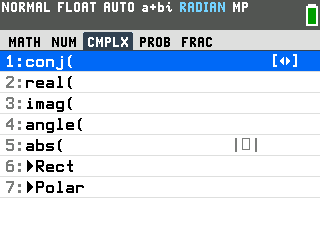
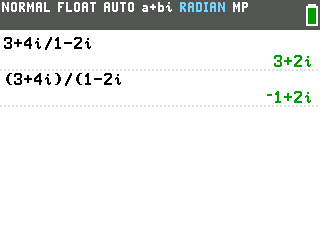
- Wrap the numerator and denominator when you divide. Type (3+4i)/(1-2i), not 3+4i/1-2i. Without the parentheses the calculator reads it as 3 + (4i/1) - 2i and returns 3+2i, while the real quotient is -1+2i. Both are on the screen below for comparison.
- Resetting the calculator turns a+bi back to REAL. If square roots of negatives start erroring again after a reset, that is where to switch a+bi back on.