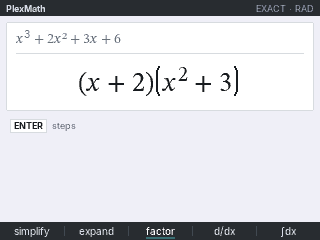
PlexMath solves equations, factors, and does derivatives, integrals and limits on your TI-84 Plus CE, then shows the work. It covers algebra through AP Calculus. Type a problem the way you would on the home screen and press enter. Press enter again on the answer for Symbolab-style steps.
Install it
Plug in your TI-84 Plus CE, turn it on, and click Connect to install PlexMath.
Sending straight to your calculator works in Chrome or Edge on a computer.
Send it from this page, then run its setup program, CASSETUP, on the calculator once. The box above tells you the keys for your calculator.
- Short on space? The box says what to delete, and deletes nothing until you click.
- It works on OS 5.3 through 5.8.5. On OS 5.5 or later the calculator needs a jailbreak to install it. After that it opens from apps like any other app, no jailbreak needed.
PlexMath's setup program, CASSETUP, is built from app_tools by the CE Programming community.
What it does
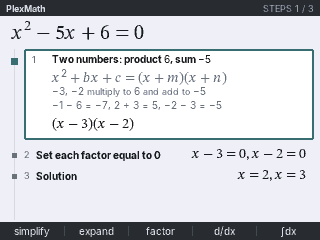
- Solve: linear, quadratic and polynomial equations, plus rational, radical, absolute value, exponential, log and trig equations. A quadratic with no real roots gives the complex ones.
- Inequalities and systems: x² − x − 6 > 0 gives x < −2 or x > 3, with the sign chart. Put a comma between equations to solve a system, like 2x+y=7, x−y=2.
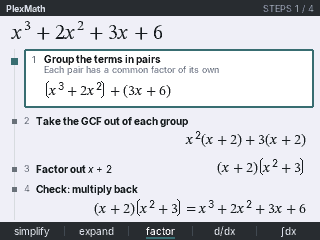
- Factor, expand and simplify: GCF, grouping, the ac method, sums and differences of cubes, and the rational root theorem. Fractions, radicals, complex numbers and trig identities.
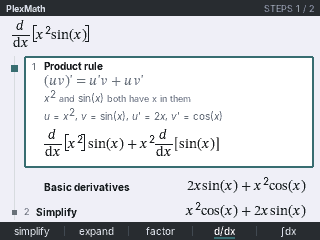
- Calculus: derivatives with the product, quotient and chain rules, and implicit differentiation. Integrals by substitution, by parts and by partial fractions, definite and improper. Limits, including L'Hôpital's rule, and Taylor polynomials.
- Matrices: determinant, inverse and rref.
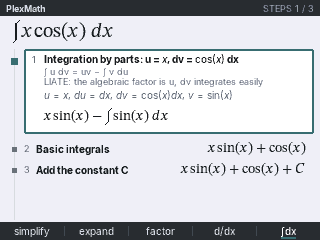
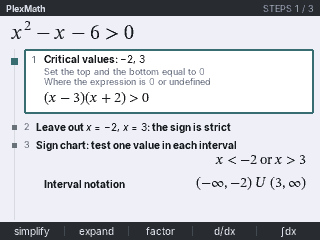
Answers stay exact: fractions stay fractions and square roots stay square roots. When an answer
has MATH 2 under it, math then 2 shows it as a decimal.
See the work
Press enter on an answer to open its steps. Each step names the rule it uses, like
Product rule or Group the terms in pairs, and shows the line it gives. Up and down move between the
steps, and clear goes back.
Keys
- Open it from
apps. The box above says which number to press. 2nd, thenmodeleaves PlexMath.- The line under a problem says what
enterwill do, like solve for x or simplify. - The five keys under the screen simplify, expand, factor, take d/dx and integrate.
sto→types =.2ndmathhas < > ≤ ≥ ≠.math, then right to CAS: limits, Taylor, ∞, second derivatives, matrices and more.2ndenterbrings back the last problem.
If PlexMath gives a wrong answer or does anything confusing, email contact@calcplex.com with what you typed and what it showed.